Your workflow is unique 👨💻 - tell us how you use Dropbox here.
Forum Discussion

dotingaunt
6 months agoNew member | Level 2
How to make files "always available offline"?
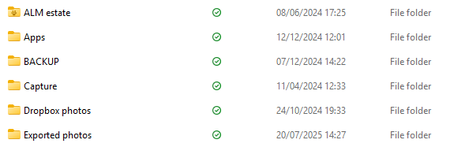
Almost all my files are showing as "available offline" rather than "always available offline". How do I change this? When I right-click, the only options I get are make online only/ view on Dropb...
- 6 months ago
Thanks for the update, dotingaunt.
Hmm, what if you make a folder "online-only" first and then switch it to "available offline"? What happens then?


Theresa Community Manager
6 months agoCommunity ManagerHi there dotingaunt and welcome to the Dropbox Community! Thanks so much for jumping in with your question... making sure your files are always available offline is such a useful setting, especially when you’re on the go.
I’m Theresa 👩💻, one of the Community Managers. You’ll often find me joining chats like this or starting new ones across the Community. Now that you’re exploring offline access, I’d love to know - do you have a favourite Dropbox feature that you rely on when you’re working remotely or without WiFi?
Looking forward to hearing more,
T😸 (Dropbox Community Manager)

dotingaunt
6 months agoNew member | Level 2
Hi
Yes - on my phone and tablet I always make sure I have downloaded the files I'm going to need if I'm out and about. Never sensible to assume the wi-fi connection will be up to the job!
About Create, Upload, and Share
Find help to solve issues with creating, uploading, and sharing files and folders with Dropbox.
The Dropbox Community team is active from Monday to Friday. We try to respond to you as soon as we can, usually within 2 hours.
If you need more help you can view your support options (expected response time for an email or ticket is 24 hours), or contact us on X, Facebook or Instagram.
For more info on available support options for your Dropbox plan, see this article.
If you found the answer to your question in this Community thread, please 'like' the post to say thanks and to let us know it was useful!


