Your workflow is unique 👨💻 - tell us how you use Dropbox here.
Forum Discussion

MrRichie
1 year agoExplorer | Level 3
Mac OS - Files are unable to sync according to the desktop app
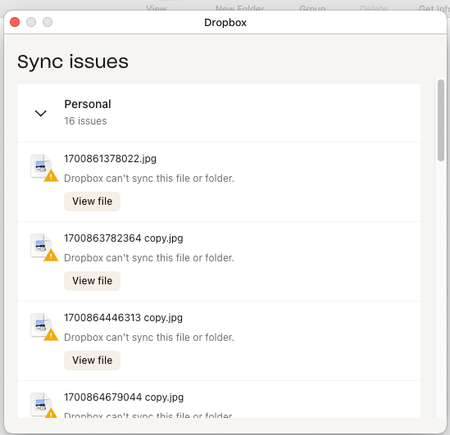
I am getting the sync issues message with macos. When I press the "view file" button, nothing happens if finder is not already open. If a finder window is already open, it just brings finder to t...

Jay Dropbox Community Moderator
1 year agoDropbox Community ModeratorHi MrRichie, thanks for bringing this to our attention.
Are you able to locate these file names manually in Finder within the Dropbox folder?
This will help me to assist further!
 MrRichie1 year agoExplorer | Level 3
Hey Jay,
I an not able find them on the local machine. They are on my online and viewable via the browser.- Megan1 year ago
Hey MrRichie, let me jump in here too!
Also, what’s the OS version of your computer, as well as the Dropbox app version?
If there's a chance that these are hidden files, then you can press Command + Shift + . (the period key) to show them in your Finder.
- MrRichie1 year agoExplorer | Level 3
I'm on Sonoma 14.5
Dropbox v 203.4.4857
This has been an issue for a few months, but Its only that it has bugged me enough to find a solution.
The files are not hidden files.

About Create, Upload, and Share
Find help to solve issues with creating, uploading, and sharing files and folders with Dropbox.
The Dropbox Community team is active from Monday to Friday. We try to respond to you as soon as we can, usually within 2 hours.
If you need more help you can view your support options (expected response time for an email or ticket is 24 hours), or contact us on X, Facebook or Instagram.
For more info on available support options for your Dropbox plan, see this article.
If you found the answer to your question in this Community thread, please 'like' the post to say thanks and to let us know it was useful!


