We’re Still Here to Help (Even Over the Holidays!) - find out more here.
Forum Discussion

Skeeter709
10 months agoNew member | Level 1
My account stopped syncing even though I have no files in it
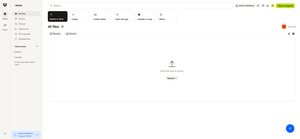
My account has stopped syncing. I have no files in my Dropbox. My account says I am using "0 of 3.2 GB" on my basic (free) plan. (see bottom left of image.) Can you reset my quota to 2.0 GBs? ...
 10 months ago
- My Dropbox on my PC is 217.4.4417
- All "files are up to date"
- I was able to sync a file just now. Perhaps the lapse in syncing caused the mix up.
- In following your advice, many of my old files, that were not visible online, were downloaded to my local Dropbox folder and then erased. A shortcut link was added.
Thanks for your help.
Skeeter709
10 months agoNew member | Level 1
- My Dropbox on my PC is 217.4.4417
- All "files are up to date"
- I was able to sync a file just now. Perhaps the lapse in syncing caused the mix up.
- In following your advice, many of my old files, that were not visible online, were downloaded to my local Dropbox folder and then erased. A shortcut link was added.
Thanks for your help.

Theresa Community Manager
10 months agoCommunity ManagerHi Skeeter709 , and welcome to the Dropbox Community 😊 I’m so glad to hear that your files have started syncing again after the delay, waiting for everything to catch up can definitely be frustrating. Now that things are back on track, I hope you can continue using your Dropbox account without any issues. 🎉
By the way, I’m Theresa, a Community Manager here at Dropbox HQ 👩💻. I love connecting with our members and hearing how they use Dropbox in their daily lives. If you’re open to sharing, I’d love to hear about your experience. ✨
Looking forward to hearing from you,
T 😸(Dropbox Community Manager)
About Create, upload, and share
Find help to solve issues with creating, uploading, and sharing files and folders in Dropbox. Get support and advice from the Dropbox Community.
The Dropbox Community team is active from Monday to Friday. We try to respond to you as soon as we can, usually within 2 hours.
If you need more help you can view your support options (expected response time for an email or ticket is 24 hours), or contact us on X, Facebook or Instagram.
For more info on available support options for your Dropbox plan, see this article.
If you found the answer to your question in this Community thread, please 'like' the post to say thanks and to let us know it was useful!


