Your workflow is unique 👨💻 - tell us how you use Dropbox here.
Forum Discussion

AkashJewels
2 years agoExplorer | Level 3
On Mac Unable to backup an external drive. No pop-up.
Hi
I'm on Mac, and I need to backup my external drive. and I can't find a way for the dropbox app to "see" the external drive!
1) when I first setup that drive, there was an auto massage from ...

AkashJewels
2 years agoExplorer | Level 3
Hi
Thanks for getting back to me Megan
you: "Can I ask the capacity and the usage of your external disk, along with the format of it please?"
It a 4tb sun disk extreme ssd , of which 2tb are used for /Time Machine [which I don't need to backup to dropbox]. and 2tb on a separate partition are used for extra storage and I wish to back this one to dropbox [there is less then 500gb of data in there currently ]
You: "One more thing: can you clarify if the desktop app is running normally when you plug the external drive into the computer in question, and also let me know the version of the Dropbox app there?"
it s the new app [with the strange path] and yes it is running normally ...
the thing is, the first time I plugged this disk, dropbox asked if I wanted to back it up. I said not now, [as I wasn't sure what I need]. and now I don't get that massage again, and I don't see any place to add the disk!
thanks a lot
Akash

Hannah Dropbox Community Moderator
2 years agoDropbox Community ModeratorHey AkashJewels, thanks for this info.
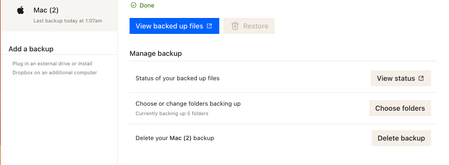
If you go to your backups page, click on "Manage Backups" and then "Open backup settings", are you able to enable backup for this drive?
- AkashJewels2 years agoExplorer | Level 3
Hi
No it simply takes me back to the same place in the desktop app and the drive is not showing there.
[I can see in there another different drive that I'm using at this moment for other purpose [I do not want to backup that other drive]
I currently have 2 external drives plugged in. the one that is showing is the one I don't need.
what else can be done?
thanks a lot
- Hannah2 years ago
Can you unplug that drive, to see if that helps the other one appear, Akash?
- AkashJewels2 years agoExplorer | Level 3
Hi
my initial post was abut only that one drive not showing [while it is the only one plugged !].
the 2nd drive is showing likely because it has be formatted [it's brand new from dropbox perspective] so it is showing.
what I'm asking please is instruction how to make dropbox forget the drive [the one that needs backup]. so it will re-include it as possible volume to backup !
how to make dropbox forget the drive ?
regarding unplugging the currently plugged drive, I can do it only after 8 hours, when it will finish transferring files. [that one is not ssd]
thanks a lot
asksh
About Create, Upload, and Share
Find help to solve issues with creating, uploading, and sharing files and folders with Dropbox.
The Dropbox Community team is active from Monday to Friday. We try to respond to you as soon as we can, usually within 2 hours.
If you need more help you can view your support options (expected response time for an email or ticket is 24 hours), or contact us on X, Facebook or Instagram.
For more info on available support options for your Dropbox plan, see this article.
If you found the answer to your question in this Community thread, please 'like' the post to say thanks and to let us know it was useful!


