Your workflow is unique 👨💻 - tell us how you use Dropbox here.
Forum Discussion

batilly84
4 years agoExplorer | Level 4
Dropbox right click menu missing (Mac OS). App says it's up-to-date.
Hello,
Thought I would reach out to you directly with a problem that I don't see the specific solution to.
My right click menu suddenly disappeared today while working on files in a Drop...

moching66
4 years agoNew member | Level 2
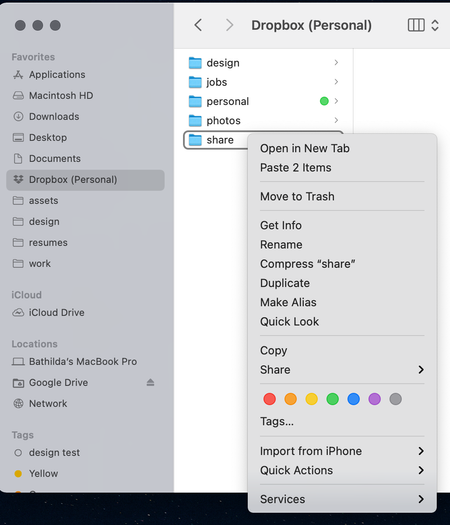
I'm also having this issue. Right click options no longer appear when I'm in my dropbox folder within my finder. Does anyone have a solution for this? Using macOS Big Sur.
- Megan4 years ago
Dropbox Community Moderator
Hey moching66, I hope you're doing well!
Can you let me know the syncing status and version of your app?
If I were you, I'd also do a quick re-install just to see if the behavior remained the same.
Keep me posted on what you find.  asbrown723 years agoHelpful | Level 5
I've got exactly the same problem. All of a sudden, on my desktop Mac (Big Sur 11.6.5, Dropbox version 149.3.4526) my right-click contextual menu does not give me all of the Dropbox options that it used to do. The one that I used most often was 'Copy Dropbox link', as I'm frequently sharing files. But now that doesn't appear (see attached), neither in the right-click menu nor in the mini Dropbox desktop app. The only solution is to click 'View on Dropbox.com' and then go through the process of creating and copying a link on Dropbox.com. Why has this changed? It continues to work correctly on my Macbook Pro (MacOS 12.0.1, Dropbox version 147.3.4765).
 danbett3 years agoHelpful | Level 7Dropbox have removed this feature in the name of progress… but without mentioning it at all. Please petition them to put it back as they are not allowing sharing from any backed up files/folders. I really don’t know why
Hope this comes back soon
Dan- asbrown723 years agoHelpful | Level 5Actually, I've since discovered the problem. It's because Dropbox, in their wisdom, have removed the function to share anything that is backed up. Now, naturally, all the files I'm working on are on the desktop of my Mac, which had been backed up via Dropbox. That now means I can do only very limited things with every file on my desktop, and that does not include sharing via a Dropbox link. Why have they done this? In their words, to avoid our inadvertently sharing sensitive files! I mean, talk about treating your customers like children. How dare they decide what we can and we cannot share of our own files? I've found an inelegant workaround, but really Dropbox you need to reverse this and reinstate the function to share any backed-up file, folder or drive.

About Create, Upload, and Share
Find help to solve issues with creating, uploading, and sharing files and folders with Dropbox.
The Dropbox Community team is active from Monday to Friday. We try to respond to you as soon as we can, usually within 2 hours.
If you need more help you can view your support options (expected response time for an email or ticket is 24 hours), or contact us on X, Facebook or Instagram.
For more info on available support options for your Dropbox plan, see this article.
If you found the answer to your question in this Community thread, please 'like' the post to say thanks and to let us know it was useful!


