Your workflow is unique 👨💻 - tell us how you use Dropbox here.
Forum Discussion

michel Salloum
2 years agoExplorer | Level 4
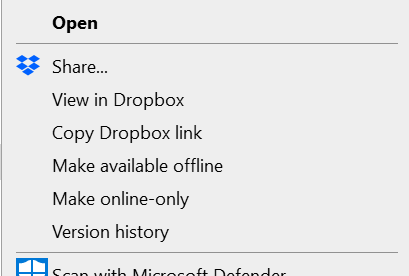
"Send a copy" isn't showing as an option on my Windows context menu
hello folks, i don't see the option of ""Send a copy" in the menu in desktop anymore:

MarcoAntonioSc
2 years agoExplorer | Level 4
Having the same problem here, it started this week. I tried updating the Dropbox app, but its the same.
Windows 10
App V183.4.7058
- Megan2 years ago
Dropbox Community Moderator
Hey MarcoAntonioSc, I just sent you a ticket, in order for us to have a closer look into this!
 Carles362 years agoNew member | Level 2
I have the same problem: when selecting multiple items and right-clicking on them, the only available options are "Online Only / Also Offline" (my OS is in Spanish, so I don't know the exact wording, sorry). It started one week ago aproximately, I guess with the last update.
I'm on Windows 10 Pro 19045.3448


About Create, Upload, and Share
Find help to solve issues with creating, uploading, and sharing files and folders with Dropbox.
The Dropbox Community team is active from Monday to Friday. We try to respond to you as soon as we can, usually within 2 hours.
If you need more help you can view your support options (expected response time for an email or ticket is 24 hours), or contact us on X, Facebook or Instagram.
For more info on available support options for your Dropbox plan, see this article.
If you found the answer to your question in this Community thread, please 'like' the post to say thanks and to let us know it was useful!


