Your workflow is unique 👨💻 - tell us how you use Dropbox here.
Forum Discussion

michel Salloum
2 years agoExplorer | Level 4
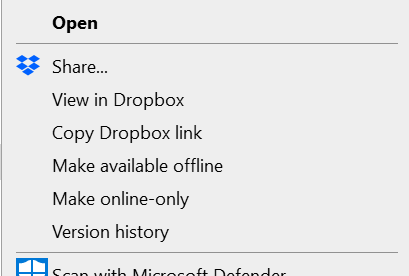
"Send a copy" isn't showing as an option on my Windows context menu
hello folks, i don't see the option of ""Send a copy" in the menu in desktop anymore:

Megan Dropbox Community Moderator
2 years agoDropbox Community ModeratorI just sent you an email elementuser, I'll see you there!

Tactical Retail
2 years agoNew member | Level 2
I am also having this issue. I have Windows 11 and just preformed an Advanced Reinstall. This did not solve the problem.
- Megan2 years ago
Hi Tactical Retail, welcome to our Community!
Could you just confirm your device's exact OS version and the version and status of the desktop app as shown in your system tray?
Let me know more, and we'll take it from there!
- Tactical Retail2 years agoNew member | Level 2
@Megan
Windows 11 Pro Version 10.0.22621 Build 22621
The status of Dropbox is normal? "Your files are up to date"
- Megan2 years ago
Hi Tactical Retail, thanks for the info!
Can you also let me know the Dropbox version you're using?
You can find this by hovering your mouse over the little Dropbox icon on your task bar, next to your WiFi.
If you could also send me a screenshot of the options you get, when you right click in a file/folder inside your Dropbox folder, that'd be amazing, thanks!
About Create, Upload, and Share
Find help to solve issues with creating, uploading, and sharing files and folders with Dropbox.
The Dropbox Community team is active from Monday to Friday. We try to respond to you as soon as we can, usually within 2 hours.
If you need more help you can view your support options (expected response time for an email or ticket is 24 hours), or contact us on X, Facebook or Instagram.
For more info on available support options for your Dropbox plan, see this article.
If you found the answer to your question in this Community thread, please 'like' the post to say thanks and to let us know it was useful!


