Your workflow is unique 👨💻 - tell us how you use Dropbox here.
Forum Discussion

michel Salloum
2 years agoExplorer | Level 4
"Send a copy" isn't showing as an option on my Windows context menu
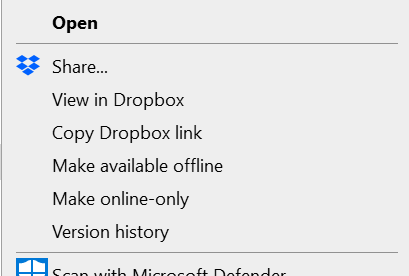
hello folks, i don't see the option of ""Send a copy" in the menu in desktop anymore:

CLoeffler2
1 year agoExplorer | Level 3
I've restarted my computer.
I've uninstalled the application, restarted my computer, reinstalled the application,
I've uninstalled the application, cleared the registry, restarted my computer, re downloaded the software.
The first picture shows right clicking on the folder and the "Send a copy" option appears, but not when I click on an individual file(the second picture).

Mark Super User II
1 year agoSuper User IIHi CLoeffler2 as none of the Dropbox context menu is appearing for the second image are those files within the Dropbox directory?
- CLoeffler21 year agoExplorer | Level 3
Both the folder and the file are outside of the dropbox directory.
- CLoeffler21 year agoExplorer | Level 3
Is there any update to this issue?
 BenDBX1 year ago
Community Manager
Hi CLoeffler2,
I've asked a member of our engineering team to look into this as it was largely fixed for most users, but we have had some reports trickling in since the fix was implemented. Is this still happening, and if so, are you consistently unable to see "send a copy" in the context menu, or is it always missing?
Let us know and we can go from there!
Thanks,
Ben
About Create, Upload, and Share
Find help to solve issues with creating, uploading, and sharing files and folders with Dropbox.
The Dropbox Community team is active from Monday to Friday. We try to respond to you as soon as we can, usually within 2 hours.
If you need more help you can view your support options (expected response time for an email or ticket is 24 hours), or contact us on X, Facebook or Instagram.
For more info on available support options for your Dropbox plan, see this article.
If you found the answer to your question in this Community thread, please 'like' the post to say thanks and to let us know it was useful!


