Your workflow is unique 👨💻 - tell us how you use Dropbox here.
Forum Discussion

michel Salloum
2 years agoExplorer | Level 4
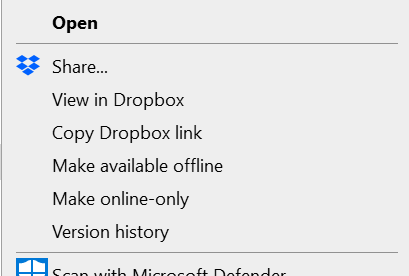
"Send a copy" isn't showing as an option on my Windows context menu
hello folks, i don't see the option of ""Send a copy" in the menu in desktop anymore:

CLoeffler2
1 year agoExplorer | Level 3
It only shows up when you right click off of a file, then you can send a copy of the entire folder. I found a work around to be right click in the folder, then hit send a copy, then delete the folder, and drag and drop the individual files I need to transfer. I rarely need to send the content of the entire folder in the transfer.

Suyeon Kang Dropbox Engineer
1 year agoDropbox Engineer
Hello CLoeffler2,
We are currently investigating this issue.
Do you know roughly which build version you started seeing this issue on?
I see that you also have a Windows 11 device. Do you encounter this issue on Windows 11 as well?
 chrshale1 year agoNew member | Level 2
You've been "investigating this issue" for months.
About Create, Upload, and Share
Find help to solve issues with creating, uploading, and sharing files and folders with Dropbox.
The Dropbox Community team is active from Monday to Friday. We try to respond to you as soon as we can, usually within 2 hours.
If you need more help you can view your support options (expected response time for an email or ticket is 24 hours), or contact us on X, Facebook or Instagram.
For more info on available support options for your Dropbox plan, see this article.
If you found the answer to your question in this Community thread, please 'like' the post to say thanks and to let us know it was useful!


