Your workflow is unique 👨💻 - tell us how you use Dropbox here.
Forum Discussion

michel Salloum
2 years agoExplorer | Level 4
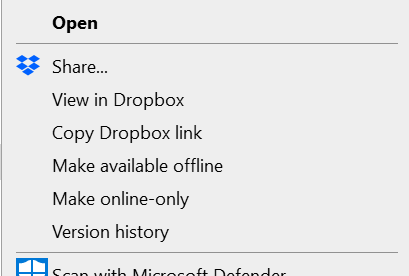
"Send a copy" isn't showing as an option on my Windows context menu
hello folks, i don't see the option of ""Send a copy" in the menu in desktop anymore:

chrshale
1 year agoNew member | Level 2
This is total bull. You've known about this issue since last
September. FIX IT.
BenDBX Community Manager
1 year agoCommunity ManagerHi Everybody,
This issue has been resolved in the latest Desktop client release. While clients automatically update, you can find the latest Stable and Beta builds at these respective links.
Please ensure your client is updated and let us know if you need any further assistance!
Thanks,
Ben
About Create, Upload, and Share
Find help to solve issues with creating, uploading, and sharing files and folders with Dropbox.
The Dropbox Community team is active from Monday to Friday. We try to respond to you as soon as we can, usually within 2 hours.
If you need more help you can view your support options (expected response time for an email or ticket is 24 hours), or contact us on X, Facebook or Instagram.
For more info on available support options for your Dropbox plan, see this article.
If you found the answer to your question in this Community thread, please 'like' the post to say thanks and to let us know it was useful!


