Your workflow is unique 👨💻 - tell us how you use Dropbox here.
Forum Discussion

RichieRich1891
2 years agoHelpful | Level 6
Shared folder online only icon missing Desktop
Hello support, The "Online-Only" icon is missing on shared folders, which are shared with me and I can only view. When I make the shared folder offline available, the "Available Offline" icon an...

Nancy Dropbox Community Moderator
2 years agoDropbox Community ModeratorWelcome back to the Community, RichieRich1891! I hope you’re doing well.
Just to clarify, this isn’t happening for personal folders that haven’t been shared with anyone else/that were created by you?
Can you send me a screenshot of what you see perhaps, so that I can take a look?
Keep me posted.

RichieRich1891
2 years agoHelpful | Level 6
Hi Nancy,
I only notice this issue with the folders, that are shared with me. Not te other way around.
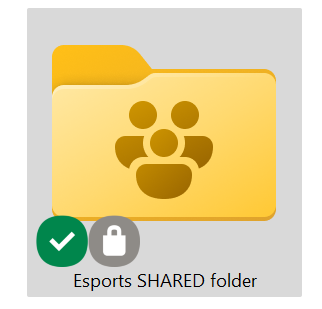
To make my issue clear, I added the example pictures to my post.
The example with the icons, is the folder offline and the one without the icons is the same folder online-only.
Greetz.
- Jay2 years ago
Hi RichieRich1891, just to be certain, could you attach an image of a normal file or folder which is marked as online-only, to confirm that the cloud icon appears on non-shared folders?
- RichieRich18912 years agoHelpful | Level 6
Hi Jay,
As you requested, an image of a normal "online-only" folder within my dropbox desktop app.
- Jay2 years ago
Thanks for the info, could you try the steps in this thread to see if the Dropbox icons appear in the top of the registry?

About Create, Upload, and Share
Find help to solve issues with creating, uploading, and sharing files and folders with Dropbox.
The Dropbox Community team is active from Monday to Friday. We try to respond to you as soon as we can, usually within 2 hours.
If you need more help you can view your support options (expected response time for an email or ticket is 24 hours), or contact us on X, Facebook or Instagram.
For more info on available support options for your Dropbox plan, see this article.
If you found the answer to your question in this Community thread, please 'like' the post to say thanks and to let us know it was useful!


