Your workflow is unique 👨💻 - tell us how you use Dropbox here.
Forum Discussion

ashtrey1980
3 years agoHelpful | Level 5
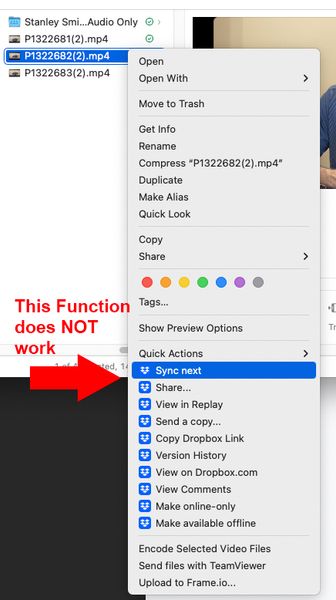
Sync Next not working through Mac Finder interface
I have lots syncing all day long. It is not uncommon for me to get back from a video shoot, upload 200 Gb (takes about 48 hours with my internet speeds), and then the next day, I'll need to upload a...

Walter Dropbox Community Moderator
3 years agoDropbox Community ModeratorHey ashtrey1980, sorry to hear you're having issues with this and thanks for your feedback.
Can you please let us know the exact OS of your device and the desktop app's version?
Also, how long has it been since you first noticed that the right-click option to prioritize a file to sync next is not working?
Is it affecting all of the files in your Dropbox folder or just some specific ones?
When it comes to your suggestions, note that you could post them separately in the Share an Idea board, so that other users can upvote them and/or share their own feedback.

ashtrey1980
3 years agoHelpful | Level 5
Thanks @Walter.
OS Monterey 12.5.
I don't recall trying to use this function on any prior OS. I actually just started using the top-tier DB a few months ago when I realized I was going to have to expand my team and collaborate remotely. Until then, I had just been a casual user.
I have yet to get this feature to work on any files. Using the other task bar method seems to work well enough (not perfect as it still seems to sync some of the other files at the same time, so "sync soon-ish" may be a better name, but I won't complain further about that).
I will also copy and paste onto that board you suggested.
Thanks!
- Hannah3 years ago
Hey ashtrey1980, have you tried to quit the Dropbox app and relaunch it, or reinstall it to see if that helps?

About Create, Upload, and Share
Find help to solve issues with creating, uploading, and sharing files and folders with Dropbox.
The Dropbox Community team is active from Monday to Friday. We try to respond to you as soon as we can, usually within 2 hours.
If you need more help you can view your support options (expected response time for an email or ticket is 24 hours), or contact us on X, Facebook or Instagram.
For more info on available support options for your Dropbox plan, see this article.
If you found the answer to your question in this Community thread, please 'like' the post to say thanks and to let us know it was useful!


