Your workflow is unique 👨💻 - tell us how you use Dropbox here.
Forum Discussion

petermooreworld
9 months agoCollaborator | Level 9
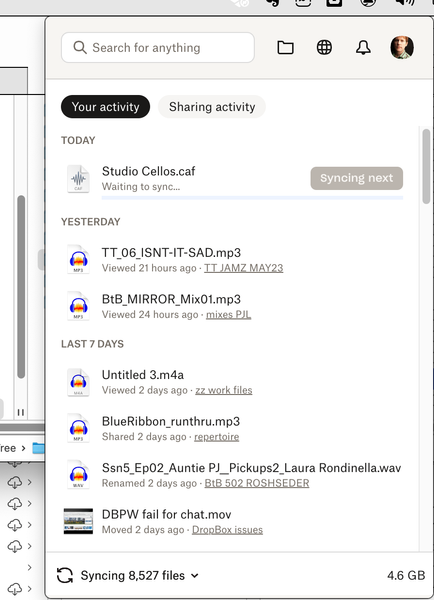
The Dropbox app on my Mac is stuck syncing some files. What can I do?
I can't get one of my devices (MacBookPro) to sync or upload any files. It appears to be hung on syncing some files. I've tried...:
switching files from "available offline" to "online-only" an...
- 9 months ago
Hey petermooreworld - just before we take this to email, can you please update to the latest version of the app from this page and let me know if the issue persists?


petermooreworld
9 months agoCollaborator | Level 9
Thanks, Mark.
No, the program using Studio Cellos is not open.
"Repairing the hardlinks" is a suggestion I found in the db community, sort of like fixing permissions: (Select 'Preferences'/ 'Account' Hold down the 'Option/Alt' key Click on the 'Fix Hardlinks' button). It didn't work, I just listed it to suggest other things I tried. I don't think it's related to symlinks.
- Mark9 months ago
Super User II
petermooreworld wrote:
No, the program using Studio Cellos is not open.
Bother!! I was, genuinely, banking on that one working.
Ok, another suggestion - do you know where the file is (or what 'file' it is in as part of a Package)?
I had a similar issue once and the database just seemed messed up. I fixed it by dragging that file out of Dropbox, waiting for it all to 'kick in and sync' and then replacing it. Doing that fixed it all - did take a few hours of syncing as it was backed up with up/downloads however but worked perfectly after.

About Create, Upload, and Share
Find help to solve issues with creating, uploading, and sharing files and folders with Dropbox.
The Dropbox Community team is active from Monday to Friday. We try to respond to you as soon as we can, usually within 2 hours.
If you need more help you can view your support options (expected response time for an email or ticket is 24 hours), or contact us on X, Facebook or Instagram.
For more info on available support options for your Dropbox plan, see this article.
If you found the answer to your question in this Community thread, please 'like' the post to say thanks and to let us know it was useful!


