Your workflow is unique 👨💻 - tell us how you use Dropbox here.
Forum Discussion

petermooreworld
9 months agoCollaborator | Level 9
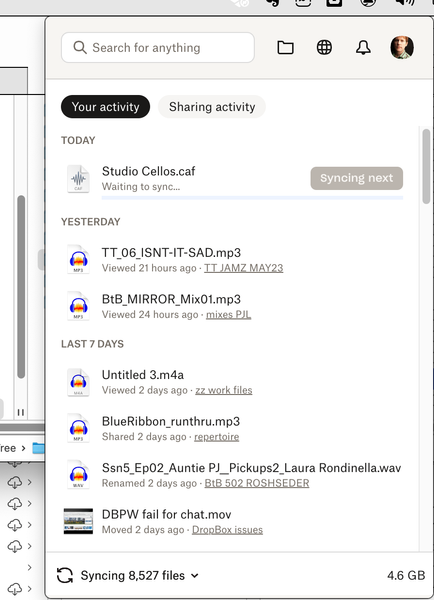
The Dropbox app on my Mac is stuck syncing some files. What can I do?
I can't get one of my devices (MacBookPro) to sync or upload any files. It appears to be hung on syncing some files. I've tried...:
switching files from "available offline" to "online-only" an...
- 9 months ago
Hey petermooreworld - just before we take this to email, can you please update to the latest version of the app from this page and let me know if the issue persists?


Megan Dropbox Community Moderator
9 months agoDropbox Community ModeratorHi petermooreworld, let me also jump in here!
Could you try to restart the app using the steps that my colleague, Nancy provided here?
One more thing I'd like to add to these steps is that if you see the Dropbox.app file file in both locations, delete the file in the second location(~/Library/Application Support/Dropbox).
If you see the file in the second location but not in the first, move the file to the first location(/Applications).
Provided that the issue isn’t resolved from there, try these steps:
- Open the Terminal application on your computer.
- Type fileproviderctl domain list.
- Press return on your keyboard.
- Please provide us with a screenshot of the output.
- Navigate to your user profile folder ~/Users/[YourUsername].
- Press command-shift-. (period). This will show your hidden files.
- Locate and delete the .dropbox folder in ~/Users/[YourUsername].

petermooreworld
9 months agoCollaborator | Level 9
Thank you both for your suggestions.
- I restarted the app per Nancy's steps. But db still showed the same info once it restarted (although as of this morning it's grown to 8,569 files).
- There was no dropbox app in that second location(~/Library/Application Support/Dropbox).
- I tried the steps you outlined above. Nothing changed, though, not sure if it was supposed to.
- Here is the screenshot of my terminal (probably only need the bottom half or so):
I should note that if I do right-click on a file on my MacBookPro's Finder and ask it to Sync Next it will jump that file to the head of the cue and sync it. (Altho I have only really tested this on smaller files).
Thanks again, -- Peter
- Hannah9 months ago
Thanks for the detailed update, Peter, we really appreciate it.
There's one more thing I'd like you to check; can you follow these steps to see if the Dropbox app has full disk access on the computer?

About Create, Upload, and Share
Find help to solve issues with creating, uploading, and sharing files and folders with Dropbox.
The Dropbox Community team is active from Monday to Friday. We try to respond to you as soon as we can, usually within 2 hours.
If you need more help you can view your support options (expected response time for an email or ticket is 24 hours), or contact us on X, Facebook or Instagram.
For more info on available support options for your Dropbox plan, see this article.
If you found the answer to your question in this Community thread, please 'like' the post to say thanks and to let us know it was useful!


