Your workflow is unique 👨💻 - tell us how you use Dropbox here.
Forum Discussion

petermooreworld
9 months agoCollaborator | Level 9
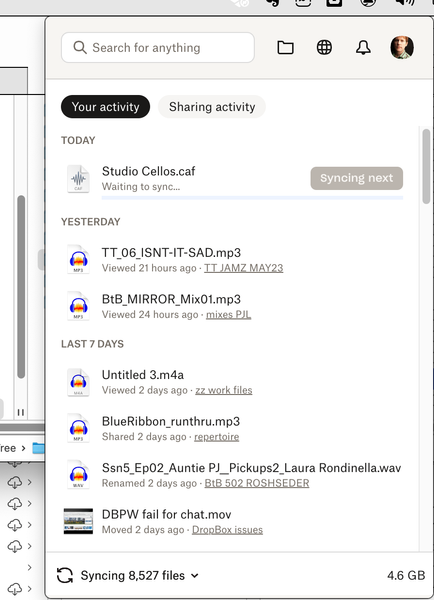
The Dropbox app on my Mac is stuck syncing some files. What can I do?
I can't get one of my devices (MacBookPro) to sync or upload any files. It appears to be hung on syncing some files. I've tried...:
switching files from "available offline" to "online-only" an...
- 9 months ago
Hey petermooreworld - just before we take this to email, can you please update to the latest version of the app from this page and let me know if the issue persists?


petermooreworld
9 months agoCollaborator | Level 9
Walter, okay, that appears to have cleared it up! Now it says "Your files are up to date" and no thousands of files in queue!
Not sure if it was the update itself or just db reinstalling that did it. All my devices were on the same version, and since DB says it auto-updates, I didn't see how a version update would be helpful. But basically the update wipes the DB from your device and re-installs. For anyone else doing this, if you already selectively sync folders so your computer isn't cluttered with old or decrepit folders, you might want to take screenshots of your folders, as this setting gets wiped and you'll have to spend some time hand-selecting which of the hundreds of folders you need your desktop to sync with. (I really wish DB developers would devise a script that could record to which folders your device syncs, to avoid this re-selecting process!)
But, hey, thanks Walter and everyone!

Theresa Community Manager
9 months agoCommunity ManagerHi petermooreworld welcome back to the Dropbox Community - great to see your files have all successfully synced to your Dropbox account 🤗.
By the way, I'm Theresa and I am one of the Community managers here at Dropbox HQ 👩💻. I see from your thread posts that you are using Dropbox for music. I love hearing how our members use Dropbox to store and file music. If you're open to sharing, It would be great to hear your Dropbox story 🤓.
We also have a Musicians Group here on the Community if you would like to join. We share lots of tips and tricks there on how to make the most out of your Dropbox account 💪.
Looking forward to hearing from you,
T 😸 (Dropbox Community Manager)
About Create, Upload, and Share
Find help to solve issues with creating, uploading, and sharing files and folders with Dropbox.
The Dropbox Community team is active from Monday to Friday. We try to respond to you as soon as we can, usually within 2 hours.
If you need more help you can view your support options (expected response time for an email or ticket is 24 hours), or contact us on X, Facebook or Instagram.
For more info on available support options for your Dropbox plan, see this article.
If you found the answer to your question in this Community thread, please 'like' the post to say thanks and to let us know it was useful!


