Your workflow is unique 👨💻 - tell us how you use Dropbox here.
Forum Discussion

mykle
3 years agoHelpful | Level 5
Unable to change Folder membership.
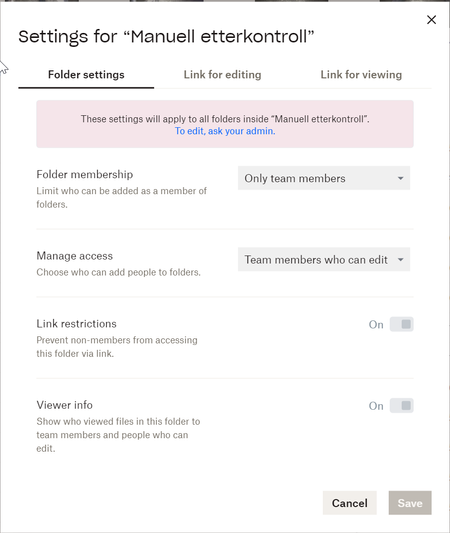
Im trying to add an external user to a folder within our team folder. This is a partner that we wish to grant access to a specific folder that has a natural place inside a larger project. When I clic...

witzyatty
1 year agoNew member | Level 1
Sure, I go into dropbox.coom and hit the share button. I try to put in my co-counsel's email address, but it tells me he is not a member of the team and wont let me.
As far as I can tell, I have allowed sharing (without limitation). I ran a test with my husband and while I can share a folder, he can only view or edit. We cannot collaborate in a folder together which is what I need to have happen with this non-member

Jay Dropbox Community Moderator
1 year agoDropbox Community ModeratorIs this a shared folder or a team folder you're trying to share?
It might be restricted to members within the same Dropbox team .
About Create, Upload, and Share
Find help to solve issues with creating, uploading, and sharing files and folders with Dropbox.
The Dropbox Community team is active from Monday to Friday. We try to respond to you as soon as we can, usually within 2 hours.
If you need more help you can view your support options (expected response time for an email or ticket is 24 hours), or contact us on X, Facebook or Instagram.
For more info on available support options for your Dropbox plan, see this article.
If you found the answer to your question in this Community thread, please 'like' the post to say thanks and to let us know it was useful!


