We're making some changes to the Dropbox Community 👩💻 - Find out more here.
Forum Discussion

Agirres
5 years agoExplorer | Level 4
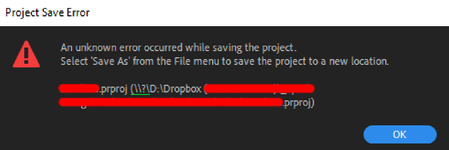
"Unknown Error" when saving an Adobe Premire Pro project directly into a Dropbox folder
I use Dropbox to store most of my files so I can share them easily, so I normaly create the projects directly on a Dropbox sync folder on my PC.
However, since some days ago, I have started get...
- 5 years ago
Thanks for the update Agirres.
In this case then, this might be caused by the syncing process when our app is running while you're also working on Adobe Premiere Pro.
Apart from quitting the app when working on your files through Adobe's Premiere Pro, you might also be able to work-around this issue by pausing the sync.
I know it's not much, but I sure hope this helps to some extent.
Please let me know if there's anything else I can assist with.


LaurenceSpliceFilms
5 years agoExplorer | Level 3
Thanks! Yes, pausing syncing on the Dropbox app works and allows me to save in Premiere. Once I close Premiere and resume syncing it seems to be fine.
Not sure if this is helpful but I noticed in the folder where the premiere file is saved, it seems to create a bunch of weirdly named files. I've attached a screengrab for reference.
So the only way to save the file while dropbox is actively syncing is to do "Save As", hence why there's 10 versions. Everytime I tried a normal "Save" it would create those additional files with the crazy names!
Hope that helps.

Lusil Dropbox Staff
5 years agoDropbox StaffThanks for the additional information, LaurenceSpliceFilms.
It looks like the files you're seeing are asset files created by the third party app, to enable it to open the project in question.
For this reason, I'd recommend pausing syncing before opening the file, saving any changes you make, closing the third party app after you're done, and resuming syncing again.
Let us know if you have any trouble even after doing this or if you have any other questions. Cheers!
- LaurenceSpliceFilms5 years agoExplorer | Level 3
Okay that's a temporary workaround but hopefully this can be fixed - it doesn't do this on my Mac in the same scenario and it's disruptive to the workflow.
Thanks.
 demafleez5 years agoExplorer | Level 4
Well, as of v104.4.175, there is *NO* option to pause syncing! Good news is I think the update fixed my Premiere saving issue. That said, I think removing pause sync feature is a step in the wrong direction. For troubleshooting purposes I think that feature is still helpful.
- Jay5 years ago
Dropbox Community Moderator
Hi demafleez, pause syncing should still exist in the Dropbox desktop application. There's been a recent change in the newest 105.4.651 version, so could you try updating to that version to test this?
To pause syncing, can need to click the Dropbox icon in the system tray/menu bar, then click the message in the bottom left (it could say syncing, or up to date), and then you should be able to pause syncing for '30 minutes', '1 hour' or 'Until tomorrow'.
Let me know how it goes!
- demafleez5 years agoExplorer | Level 4
Thanks for the followup Jay . I've updated to the latest version and the pause function is indeed there. I was looking for it under the account icon at the top right and honestly had no idea that hovering over the bottom right 'up to date' icon would offer up the pause function. Not sure if that's how it functioned in prior versions, but you guys/gals might wanna add an ellipsis(...) to that icon or something to indicate that it is actually button that has functionality rather than it being mistaken for just a static status condition. Thanks!
 NexusMotion5 years agoExplorer | Level 4
This is an incredibly annoying problem and needs to be fixed. It didn't do this before, and it doesn't always do it. Seems to only happen on certain projects for me. This issue also seems to be related to updates this year where Dropbox "holds on" to files and makes them impossible to delete or move because "another application is using these files." For someone in a production environment using Dropbox as a business and paying good money for syncing, we shouldn't have to quit or pause your services to save a file.
- DaveVeal5 years agoExplorer | Level 4
Using DB as our small design firm's main tool. FURIOUS that this is still a problem. And ONLY with premiere for us. AEX, C4D everything else is fine. Pausing DB while working is antithetical to the point of real time cloud back up. This HAS to be addressed. Pausing and stopping all our synching across multiple projects while one editor is working in premiere is ridiculous. DB, please get with Adobe and figure this out. Clearly something DB did with a new build broke this as it's showing up no matter what version of Premiere one uses. Ones that used to function fine w DB. Please advise. Running DB 114.4.368, windows 10. Premiere 2019/2020
- NexusMotion5 years agoExplorer | Level 4
Absolutely. Plus when you pause the Dropbox it takes FOREVER to turn back on and give you right-click options again. And now dropbox has to be restarted like 10 times a day cause it just stops working and only acts like it's syncing. There's something terrible going on behind the scenes right now and they need to fix it. As someone who runs a business in quarantine using this paid service, it should work better than this. I've had this service for YEARS and it's getting more and more bloated.
- DaveVeal5 years agoExplorer | Level 4
Couldn't agree more. I totally forgot about the disappearing right click options i've been seeing in mac. Sporatically i've had to link out to the web browser versions of files just to generate a share link for a client email. Honestly considering other options because of these latest developments. But based upon the lack of concern from DB and their above "excitement" that pausing "solved" the OP's problem, they don't seem to be very concerned if at all.
- NexusMotion5 years agoExplorer | Level 4
Yep same here! Having to manually upload and link via the web because it takes too long for it to get up and running again. I'm on a $15,000 machine with 1gig internet. Shouldn't be that slow. This is by far not "SOLVED." Maybe we should all repost this issue so it doesn't come across as solved.
- DaveVeal5 years agoExplorer | Level 4
I was laughing just now thinking the same thing... "SOLVED"??!!! The solution is to LITERALLY stop using the product??? Then start using the product. LOLOL. I love customer service these days. Like that old joke... "Doctor... my arm hurts when I do this..."

About Create, Upload, and Share
Find help to solve issues with creating, uploading, and sharing files and folders with Dropbox.
The Dropbox Community team is active from Monday to Friday. We try to respond to you as soon as we can, usually within 2 hours.
If you need more help you can view your support options (expected response time for an email or ticket is 24 hours), or contact us on X, Facebook or Instagram.
For more info on available support options for your Dropbox plan, see this article.
If you found the answer to your question in this Community thread, please 'like' the post to say thanks and to let us know it was useful!


