Your workflow is unique 👨💻 - tell us how you use Dropbox here.
Forum Discussion

DBuser3000
8 months agoNew member | Level 2
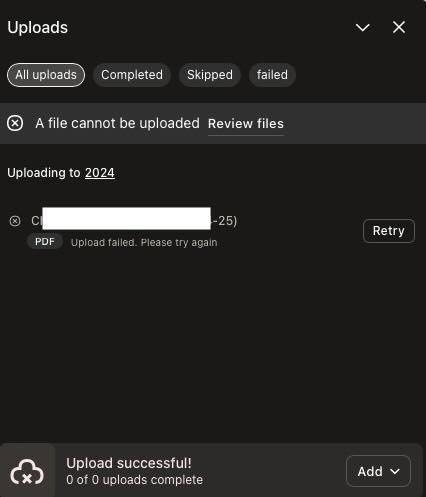
"Upload failed. Please try again" error when uploading files on the website
Upload failed. Please try again
Has been happening for the last 2 weeks. I'm using Safari.
I'm on the basic plan, used just over 463MB. The files I'm trying to upload are pdf and csv files, 20-60...
 8 months ago
As I wrote the help piece above, I tried something else - Chrome. Works fine. Looks like Apple has fiddled with Safari and broken functionality.
Safari Version 18.2 (19620.1.16.111.6, 19620)
DBuser3000
8 months agoNew member | Level 2
As I wrote the help piece above, I tried something else - Chrome. Works fine. Looks like Apple has fiddled with Safari and broken functionality.
Safari Version 18.2 (19620.1.16.111.6, 19620)

Hannah Dropbox Community Moderator
8 months agoDropbox Community ModeratorHey DBuser3000, thanks for posting today.
I'm glad to see you don't have this issue on your Chrome browser.
Make sure to clear the cache on Safari to see if it helps.
Thanks!
About Create, upload, and share
Find help to solve issues with creating, uploading, and sharing files and folders in Dropbox. Get support and advice from the Dropbox Community.
The Dropbox Community team is active from Monday to Friday. We try to respond to you as soon as we can, usually within 2 hours.
If you need more help you can view your support options (expected response time for an email or ticket is 24 hours), or contact us on X, Facebook or Instagram.
For more info on available support options for your Dropbox plan, see this article.
If you found the answer to your question in this Community thread, please 'like' the post to say thanks and to let us know it was useful!


