Your workflow is unique 👨💻 - tell us how you use Dropbox here.
Forum Discussion

Michael N.28
4 years agoCollaborator | Level 8
Why does DropBox rename photos based on modification date rather than creation date?
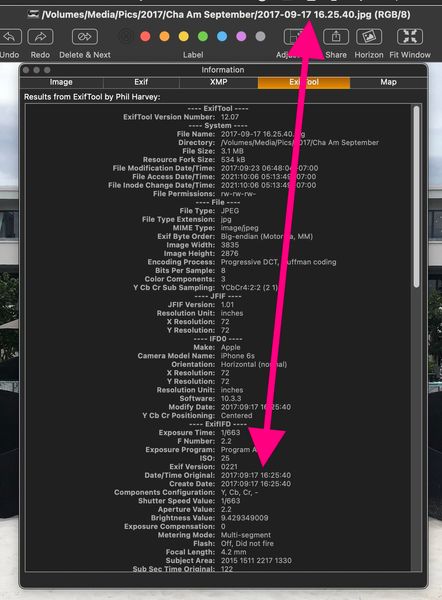
Previously, DropBox renamed camera uploads based on the photos creation date (EXIF: Date/Time Original). This makes sense because you want the photos to be name-sorted based on when they were taken. ...

Michael N.28
4 years agoCollaborator | Level 8
Thank you so much for confirming that I am not alone in noticing this change in DropBox Camera Uploads behavior. It is quite annoying.
If you are at all command line capable, then you can use the following one liner to change the file name back to matching the EXIF create date. I'm sure there are GUI tools that can do the same thing.
You will need to install exiftool.
The file names will look like this:
2021-09-29-104154-000.heic
exiftool -d '%Y-%m-%d-%H%M%S%%-03.c.%%e' '-filename<CreateDate' ~/Dropbox/Camera\ Uploads

JenniferDH
3 years agoNew member | Level 2
Wow, that's a slick (read: intimidating) code. I really want to do that with my images.... but definitely would need more help or step detail on that installation and code line. Anyone up to help me?
About Create, Upload, and Share
Find help to solve issues with creating, uploading, and sharing files and folders with Dropbox.
The Dropbox Community team is active from Monday to Friday. We try to respond to you as soon as we can, usually within 2 hours.
If you need more help you can view your support options (expected response time for an email or ticket is 24 hours), or contact us on X, Facebook or Instagram.
For more info on available support options for your Dropbox plan, see this article.
If you found the answer to your question in this Community thread, please 'like' the post to say thanks and to let us know it was useful!


