Your workflow is unique 👨💻 - tell us how you use Dropbox here.
Forum Discussion

DeepFilip
7 years agoNew member | Level 2
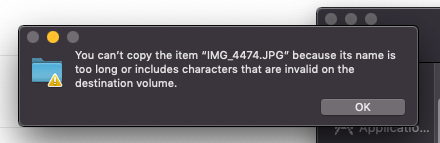
"You can't copy the item because its name is too" when copying a folder on my Mac.
Hi, I have a Dropbox account with 2TB of which 6% is full right now. I am trying to copy a folder that only has a couple of GBs and I am getting this error message. What is wrong with the filename "...
- 6 years agoHey there (DeepFilip), thanks for keeping the thread updated with the progress & apologies for getting back in touch with you with a slight delay. While this has been discussed here previously, I’d happily explain in a bit more depth under this conversation for posterity.It would be worth noting that there are files that your applications can't process correctly because they have file paths that are too long.This behavior is present if there are more than 255 characters in the entire file path. This means from the C:\ all the way to the extension of a file.As an example if you had a test.txt file in your Dropbox that had the following path:
C:\Users\YourName\My Documents\Dropbox\test.txtThis file would have a path that is 47 characters long.The Dropbox desktop application can read and write to locations that are longer than 255 characters, which means that files will sync to and from those locations, however, the applications used to open or save said files (e.g. Word, Notepad, Excel, &c.) might not support reading from or writing to these locations with long file paths and may show error messages when trying to open, save or edit them.Hopefully my message addresses your initial inquiry, however please feel free to check back with us here if you have any additional questions or thoughts!


kylestauffer
3 years agoNew member | Level 2
I've been battling this for a month now. I'm attempting to move our file archive of 64TB(!) onto DB and keep getting these stupid errors. They're random. Sometimes it's one folder, the next it's one inside it. They're all short file names, and no special characters. It's a bug, despite what support says. I don't even know that I can trust DB to have all the files and not corrupt at this point.
I'm on MacOS High Sierra on that machine.

Walter Dropbox Community Moderator
3 years agoDropbox Community ModeratorHey kylestauffer, sorry to hear about this.
Can you send us a screenshot of the exact error you're getting so that we can have a visual too?
Also, have you tried doing this in smaller batches of files or through a web browser instead? Do you also get an error there?
About Create, Upload, and Share
Find help to solve issues with creating, uploading, and sharing files and folders with Dropbox.
The Dropbox Community team is active from Monday to Friday. We try to respond to you as soon as we can, usually within 2 hours.
If you need more help you can view your support options (expected response time for an email or ticket is 24 hours), or contact us on X, Facebook or Instagram.
For more info on available support options for your Dropbox plan, see this article.
If you found the answer to your question in this Community thread, please 'like' the post to say thanks and to let us know it was useful!


