We’re Still Here to Help (Even Over the Holidays!) - find out more here.
Forum Discussion

smcintyre
10 months agoExplorer | Level 3
"Account out of storage space " warning, but I have plenty of storage space.
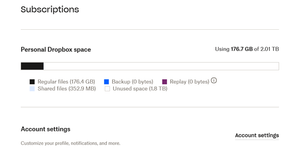
I am getting a warning that I am out of account storage, sent to email address #1. When I "Click to view my options" it takes me to my paid Dropbox account (which uses email address #2). It shows I h...

Rich Super User II
10 months agoSuper User IIsmcintyre wrote:But why is it connected to my paid Dropbox account showing the other email address?
It's not connected. The link opens in whatever account you're currently signed in to. If you sign out of the account that uses email #2 and then click the link again, you'll be prompted to sign in (because you signed out) and you can then sign in with email #1.
About Storage Space
Looking for help with managing the storage space in your Dropbox account? Talk to the Dropbox Community and get advice from members.
The Dropbox Community team is active from Monday to Friday. We try to respond to you as soon as we can, usually within 2 hours.
If you need more help you can view your support options (expected response time for an email or ticket is 24 hours), or contact us on X, Facebook or Instagram.
For more info on available support options for your Dropbox plan, see this article.
If you found the answer to your question in this Community thread, please 'like' the post to say thanks and to let us know it was useful!


