Need to see if your shared folder is taking up space on your dropbox 👨💻? Find out how to check here.
Forum Discussion

jendavisfromca
2 years agoHelpful | Level 5
Dropbox online-only consuming hard drive space on Windows
I set my Dropbox and folders to online only but it is still taking up the majority of my hard drive. The files are (also?) located on my c drive: C:\Users\JaneDoe\Dropbox. If I delete a folder from...
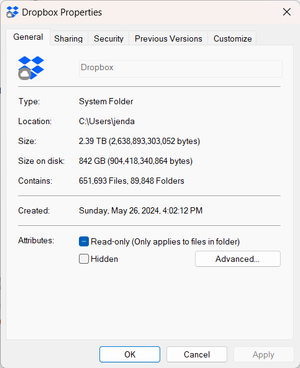
- 2 years ago
Hi jendavisfromca, thanks for bringing this to our attention.
Could you check to see if there is a Dropbox cache folder which you can delete?
Also, could you let me know more about what you mean when deleting a folder deletes it everywhere?
This will help me to assist further!


jendavisfromca
2 years agoHelpful | Level 5
This totally worked. Thank you so much.

Theresa Community Manager
2 years agoCommunity ManagerHi jendavisfromca , I am so glad to see your issue has been resolved. Thanks so much for coming back to the Community to let us know it worked for you (it's people like you who keep our Community spirit going 🙌).
By the way, I’m Theresa, a Community Manager here at Dropbox HQ 👩💻. If you're open to sharing, I’d love to hear how you use Dropbox daily and what features you rely on.
You never know, we might even be able to share tips to boost your productivity 💪.
Looking forward to hearing from you,
T 😺 (Dropbox Community Manager)
About Storage Space
Looking for help with managing the storage space in your Dropbox account? Talk to the Dropbox Community and get advice from members.
The Dropbox Community team is active from Monday to Friday. We try to respond to you as soon as we can, usually within 2 hours.
If you need more help you can view your support options (expected response time for an email or ticket is 24 hours), or contact us on X, Facebook or Instagram.
For more info on available support options for your Dropbox plan, see this article.
If you found the answer to your question in this Community thread, please 'like' the post to say thanks and to let us know it was useful!


