We’re Still Here to Help (Even Over the Holidays!) - find out more here.
Forum Discussion

benhen31
2 years agoExplorer | Level 4
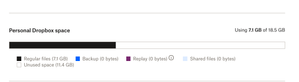
Email telling me I'm out of space and syncing has stoped, but I'm not.
I keep getting an email every few days telling me I'm out of space and syncing has stoped, but I'm not, and it hasn't.
Dropbox works as normal, but I keep getting the e-mails. What gives?
Scr...

Mark Super User II
2 years agoSuper User IIAre you positive on the new phone you have logged in to the correct account? If you add a file on that device does it appear on the website for example?

avdm
2 years agoExplorer | Level 4
Yes, Mark
I'm using Dropbox with this account, as usual, and everything is working fine, including syncing across my devices. The test that you suggested, adding a file to my phone, is my primary use case and is working correctly. I can see these files on the web Dropbox and in my other synced devices.
- Mark2 years ago
As long as you are under the limit then I'd ignore the email 🙂
Its either a whoops in the system, an auto generated one (although not usually that low on quota) or a fake phishing one
- avdm2 years agoExplorer | Level 4
Thank you, Mark
Just in case, I did a local backup.
By now, I'll continue using it normally.
I'll share any change in the scenario.- DBX_Pedro2 years ago
Community Manager
Hi everyone,
We wanted to let you know that the data has been correctly updated.
As a result, this issue will no longer occur.
If you have any further questions or need assistance, feel free to reach out.

About Storage Space
Looking for help with managing the storage space in your Dropbox account? Talk to the Dropbox Community and get advice from members.
The Dropbox Community team is active from Monday to Friday. We try to respond to you as soon as we can, usually within 2 hours.
If you need more help you can view your support options (expected response time for an email or ticket is 24 hours), or contact us on X, Facebook or Instagram.
For more info on available support options for your Dropbox plan, see this article.
If you found the answer to your question in this Community thread, please 'like' the post to say thanks and to let us know it was useful!


