Your workflow is unique 👨💻 - tell us how you use Dropbox here.
Forum Discussion

Lisgck1
4 months agoNew member | Level 2
Having trouble deleting my content. The option isn't there.
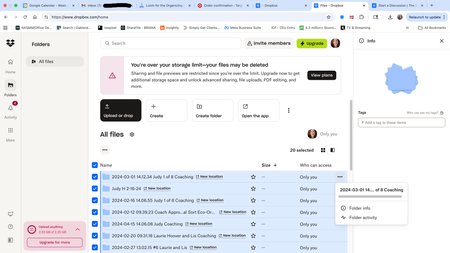
Dropbox Plan Basic Device iMac Operating System/Browser (if using the web) Ventura 13.7.8 Question or Issue An email from DropBox invited me to save my computer's files to DropBox. Wh...
- 4 months ago
Hi there, Lisgck1 welcome to our Community!
Based on the info you've provided along with your screenshots, it looks like you're using our Dropbox Backup feature.
When you click the "New location" next to your folders are you redirected to our backups page by any chance?
If so, could you please check there if you have the option to delete the content from there?
Let me know more. Thanks!


Lisgmck1
4 months agoExplorer | Level 4
Solution worked but I don't see where to "mark as accepted solution." - Lisgmck1

Theresa Community Manager
4 months agoCommunity ManagerHi Lisgmck1 and welcome to the Dropbox Community! I’m really glad to hear everything is sorted now and a big thank you to Megan for her amazing assistance on this one 👏
I’m Theresa 👩💻, one of the Community Managers here at Dropbox. Now that things are resolved, I’d love to know... do you have a favourite Dropbox feature that helps you stay organised or manage your content more easily?
Looking forward to hearing more,
T 😺 (Dropbox Community Manager)
About Storage Space
Looking for help with managing the storage space in your Dropbox account? Talk to the Dropbox Community and get advice from members.
The Dropbox Community team is active from Monday to Friday. We try to respond to you as soon as we can, usually within 2 hours.
If you need more help you can view your support options (expected response time for an email or ticket is 24 hours), or contact us on X, Facebook or Instagram.
For more info on available support options for your Dropbox plan, see this article.
If you found the answer to your question in this Community thread, please 'like' the post to say thanks and to let us know it was useful!


