Need to see if your shared folder is taking up space on your dropbox 👨💻? Find out how to check here.
Forum Discussion

johnnyfrezzony
10 months agoNew member | Level 1
I keep seeing errors that my storage is full and syncing isn't possible, but that's not true.
Hi guys,
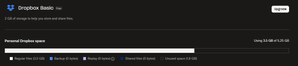
I periodically receive errors that my storage is full and sync is paused. I am using Basic 2GB but received additional storage a long time ago. I have over 1.7GB of free storage. I tried t...

johnnyfrezzony
10 months agoNew member | Level 1
Hi Nancy, I found an issue, it is not related to the Dropbox storage, but my PC HDD 😂 Windows downloaded updates and they are occupying the HDD. So no issue with Dropbox. If needed you can delete this post 😉
- Nancy10 months ago
Dropbox Community Moderator
Glad you were able to resolve this and don’t worry at all about the post! 😊
Hard drive space can also be an issue, so it would explain the notifications.

About Storage Space
Looking for help with managing the storage space in your Dropbox account? Talk to the Dropbox Community and get advice from members.
The Dropbox Community team is active from Monday to Friday. We try to respond to you as soon as we can, usually within 2 hours.
If you need more help you can view your support options (expected response time for an email or ticket is 24 hours), or contact us on X, Facebook or Instagram.
For more info on available support options for your Dropbox plan, see this article.
If you found the answer to your question in this Community thread, please 'like' the post to say thanks and to let us know it was useful!


