Need to see if your shared folder is taking up space on your dropbox 👨💻? Find out how to check here.
Forum Discussion

UK-BloodRunner
10 months agoNew member | Level 1
I received an email stating I've used all my promotional space, but this isn't the case.
I received an email from Dropbox this morning that basically contains lies. Now I know misinformation is becoming the norm over the pond, but I'd like to think that here in the UK we can keep a reaso...
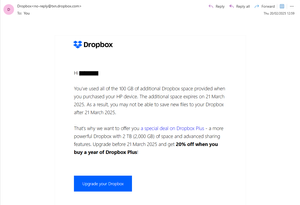
- 10 months ago
Thanks for letting us know about this, UK-BloodRunner.
If you've made sure that your account isn't over its quota, you can ignore these emails.
However, let me also note that once your HP promo ends, your account will then return back to its allocated quota.
That's why you got the email, to inform you in case you need to upgrade if you want more space.
We've passed your comments along to our team and if you need anything else, let us know.
Thanks.

Megan Dropbox Community Moderator
10 months agoDropbox Community ModeratorThanks for letting us know about this, UK-BloodRunner.
If you've made sure that your account isn't over its quota, you can ignore these emails.
However, let me also note that once your HP promo ends, your account will then return back to its allocated quota.
That's why you got the email, to inform you in case you need to upgrade if you want more space.
We've passed your comments along to our team and if you need anything else, let us know.
Thanks.
 UK-BloodRunner10 months agoNew member | Level 1
Thanks Megan for your prompt reply and passing my feedback to your team.
I think we probably have a different opinion as to why I was sent the email. Please don't think I'm knocking the product in any way as I have been a long time user and have promoted the product to individuals and companies over the time I worked within the IT industry.
However, when an email starts "You’ve used all of the 100 GB of additional Dropbox space provided when you purchased your HP device." and that is not the case, then I do feel it could be viewed as deliberately misleading.
About Storage Space
Looking for help with managing the storage space in your Dropbox account? Talk to the Dropbox Community and get advice from members.
The Dropbox Community team is active from Monday to Friday. We try to respond to you as soon as we can, usually within 2 hours.
If you need more help you can view your support options (expected response time for an email or ticket is 24 hours), or contact us on X, Facebook or Instagram.
For more info on available support options for your Dropbox plan, see this article.
If you found the answer to your question in this Community thread, please 'like' the post to say thanks and to let us know it was useful!


