We’re Still Here to Help (Even Over the Holidays!) - find out more here.
Forum Discussion

hakt0r
10 months agoNew member | Level 1
I've suddenly run out of space after 13 yrs and lots of referral space
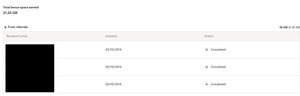
Been using dropbox for a very long time and back in 2014 I worked hard through their promotion and got a lot of referral storage and managed to claw up to 25GB of space and today I find myself out of...
- 10 months ago
Hey there, hakt0r, thanks for joining our Community.
There are a few reasons why your account might get full.
- Your account is full of personal (standard) files
- You have shared folders and the files other members add to the folders are bringing your account over its quota
- You have a backup that's taking up your space
- All of the above
In your case, according to your screenshot, your account consists mostly of standard files, but you also have some shared folders.
You can use the steps in this article to view the size of files and calculate the size of folders in your account, to see which of them are taking up your space.
I hope this helps and if you have any other questions, let me know.

hakt0r
10 months agoNew member | Level 1
You may be correct! but if you see from the images above I've got 21.25GB + 5.25GB = 26.5GB of space yet the account shows only 23.5GB.
Now that I've deleted 5GB off this I am able to use this but I wonder where the extra space went. =) thank you for your help.

Hannah Dropbox Community Moderator
10 months agoDropbox Community ModeratorHi again, hakt0r!
So, basically, 21.25GB is your total bonus space, which consists of 16GB of referral space and 5.25GB from the other ways you've earned space.
Along with the 2GB that the free Basic account gives you, you have a total of 23.5GB of space.
I hope this clarifies things!
About Storage Space
Looking for help with managing the storage space in your Dropbox account? Talk to the Dropbox Community and get advice from members.
The Dropbox Community team is active from Monday to Friday. We try to respond to you as soon as we can, usually within 2 hours.
If you need more help you can view your support options (expected response time for an email or ticket is 24 hours), or contact us on X, Facebook or Instagram.
For more info on available support options for your Dropbox plan, see this article.
If you found the answer to your question in this Community thread, please 'like' the post to say thanks and to let us know it was useful!


