We’re Still Here to Help (Even Over the Holidays!) - find out more here.
Forum Discussion

GoranD
6 months agoHelpful | Level 5
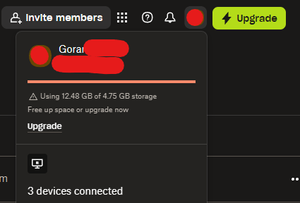
My Dropbox account is showing 3x more data than I have on my disc and shared folders.
Hi, recently my Dropbox has warned me about going above quota (I use basic and should have a total of 4.8 GB available). The problem is - it is showing that I've gone to more than 12 GB when in fact ...
 6 months ago
Hey, thank you for this link!
Turns out, bulk of my Dropbox is assigned 'backup'. Upon further inspection, it seems that I've mistakenly clicked on backing up an SD card I use to Dropbox. Since it's a dashcam card, it was filled with recordings, and the rest is history.
I've deleted the backup and everything is now back to normal. Thank you once again! 😁
GoranD
6 months agoHelpful | Level 5
Hey, thank you for this link!
Turns out, bulk of my Dropbox is assigned 'backup'. Upon further inspection, it seems that I've mistakenly clicked on backing up an SD card I use to Dropbox. Since it's a dashcam card, it was filled with recordings, and the rest is history.
I've deleted the backup and everything is now back to normal. Thank you once again! 😁

Theresa Community Manager
6 months agoCommunity ManagerHi there 👋 and welcome back to the Dropbox Community – we’re always happy to have you here!
A huge thanks for following up with your findings and for breaking it down so clearly. It’s insights like yours that really help others navigate similar situations, and you’ve added real value to the conversation here. Much appreciated! 🌟
I’m Theresa 👩💻, one of the Community Managers in the forum. I love seeing our members learn from each other and share tips that make Dropbox even easier to use.
By the way, is there a Dropbox feature you’ve come to rely on more lately? Always curious what folks are finding most helpful these days.
Chat soon,
T😺 (Dropbox Community Manager)
About Storage Space
Looking for help with managing the storage space in your Dropbox account? Talk to the Dropbox Community and get advice from members.
The Dropbox Community team is active from Monday to Friday. We try to respond to you as soon as we can, usually within 2 hours.
If you need more help you can view your support options (expected response time for an email or ticket is 24 hours), or contact us on X, Facebook or Instagram.
For more info on available support options for your Dropbox plan, see this article.
If you found the answer to your question in this Community thread, please 'like' the post to say thanks and to let us know it was useful!


