Need to see if your shared folder is taking up space on your dropbox 👨💻? Find out how to check here.
Forum Discussion

wamsender
2 years agoExplorer | Level 4
Says I’m maxed out on storage, but I’m not…
I have 18.25 gigs available that I got for free from several people signing up for a Dropbox account through me. I deleted 90% of everything…and permanently deleted…and it still shows maxed out and now I can’t upload anything else. Help?
wamsender wrote:
Can I delete my backup? That seems to be the problem...???
As mentioned on Saturday, you have the backup feature enabled. Refer to the following links to learn how to manage your backups.

30 Replies
Replies have been turned off for this discussion
- Rich2 years ago
Super User II
wamsender wrote:
Can I delete my backup? That seems to be the problem...???
As mentioned on Saturday, you have the backup feature enabled. Refer to the following links to learn how to manage your backups.
 wamsender2 years agoExplorer | Level 4
Perfect! Thank you!!!!!
 ianshere2 years agoExplorer | Level 3
I have this issue as well. 2.2Gb used out of 11.38Gb. No, it's not auto backups - I don't have that enabled. If I go to backups, I see an empty screen.
- Walter2 years ago
Dropbox Community Moderator
Hey ianshere - sorry to hear you're having issues with this.
Could you clarify what's shown in your plan page in regards to your quota exactly?
- ianshere2 years agoExplorer | Level 3
11.38Gb. 2.2Gb used. It's a basic plan but I did a lot of add-ons to get it to that.
- Walter2 years ago
So you're not near your account's quota limit then ianshere?
Do you see any files taking up space on your homepage or the sharing tab by any chance?
- ianshere2 years agoExplorer | Level 3
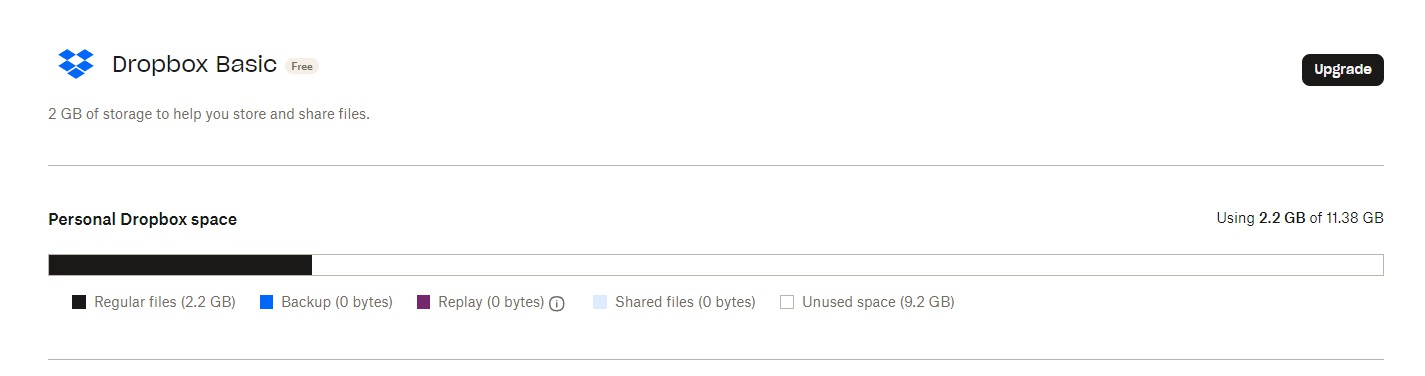 Not even vaguely close to my limit - 2.22Gb of 11.38Gb Dropbox reports. I checked, and cleaned out, a bunch of files and folders from Shared and Home Page, but it didn't make a difference to the 2.22Gb that I was reported as using, and, when trying to copy a single small file - 3-400kb - it failed again.
 - Nancy2 years ago
Hey ianshere. For some reason, I’m unable to see your screenshot. Can you try to upload it again by clicking on the button showing below?

- ianshere2 years agoExplorer | Level 3
- Rich2 years ago
ianshere wrote:
Not even vaguely close to my limit - 2.22Gb of 11.38Gb Dropbox reports.
Where are you seeing a message about being out of space? Do you have a screenshot of that message?
... when trying to copy a single small file - 3-400kb - it failed again.Do you have a screenshot of the exact error you're receiving?


About Storage Space
Looking for help with managing the storage space in your Dropbox account? Talk to the Dropbox Community and get advice from members.
The Dropbox Community team is active from Monday to Friday. We try to respond to you as soon as we can, usually within 2 hours.
If you need more help you can view your support options (expected response time for an email or ticket is 24 hours), or contact us on X, Facebook or Instagram.
For more info on available support options for your Dropbox plan, see this article.
If you found the answer to your question in this Community thread, please 'like' the post to say thanks and to let us know it was useful!


