We’re Still Here to Help (Even Over the Holidays!) - find out more here.
Forum Discussion

afrb2
3 years agoExplorer | Level 4
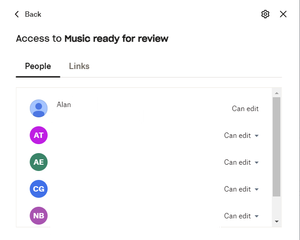
Unable to leave shared folder - no dropdown by "can edit"
I'm out of storage in basic and tried following the instructions to leave a shared folder. I'm not the owner, but when I get to the menu for who can access I don't have a dropdown by the "can edit", ...

Rich Super User II
3 years agoSuper User II
afrb2 wrote:
I'm out of storage in basic and tried following the instructions to leave a shared folder.
I believe you're following the wrong instructions. It sounds like you're following the instructions to remove a member from a folder you own, rather than the instructions for removing a shared folder from your own account. Try these instead:
 afrb23 years agoExplorer | Level 4
Thanks!
I have tried to follow these instructions:
I hovered over the folder went to the Share (box with arrow pointing out) and the next step is to Click [x] people have access.
The closest I see is "Who can access" which takes me to the screen which as you say is identical to the one for removing a member's access.
Very puzzled....
- Hannah3 years ago
Dropbox Community Moderator
Strange issue here indeed, afrb2.
Can you try this from a different browser or a private browsing window, to see if you get a different behavior?
- afrb23 years agoExplorer | Level 4
Have tried on another PC and in an "incognito" window in chrome and firefox on another PC and got the same in all cases. Maybe the fact I am out of space is relevant ? Maybe I need to ask the person who shared the folder to remove me.

About Storage Space
Looking for help with managing the storage space in your Dropbox account? Talk to the Dropbox Community and get advice from members.
The Dropbox Community team is active from Monday to Friday. We try to respond to you as soon as we can, usually within 2 hours.
If you need more help you can view your support options (expected response time for an email or ticket is 24 hours), or contact us on X, Facebook or Instagram.
For more info on available support options for your Dropbox plan, see this article.
If you found the answer to your question in this Community thread, please 'like' the post to say thanks and to let us know it was useful!


