Your workflow is unique 👨💻 - tell us how you use Dropbox here.
Forum Discussion

regenerative rebecca
6 months agoNew member | Level 2
Why am I exceeding my limit if I have zero files on my account?
Hello,
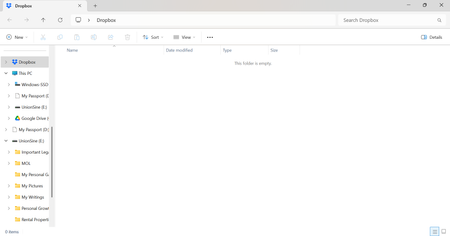
I am a BASIC account holder and I continually get emails notifying me that I have exceeded my 2G limit and need to upgrade. However, when I login to my account there are NO files or folders....

regenerative rebecca
6 months agoNew member | Level 2
Thanks Jay From the link you shared it does look like the space is being used by a "Device Backup" but I have no idea which device or how to turn that off. Can you help with that as well?
- Jay6 months ago
Dropbox Community Moderator
Thanks for the info. You can delete your Dropbox Backup by following these steps when logged into your Dropbox account.
 valdal2245 months agoNew member | Level 2
I have nothing in my account, but still says i need to upgrade.
- Megan5 months ago
Hey valdal224, thanks for posting here today!
In regards to the prompt asking you to upgrade your account: did you receive an email about this or a notification inside your Dropbox account?
Is it possible that you're seeing this when trying to add new shared files/folders to your account?
If you made sure that the notification is linked to the same Dropbox account as the one you sent me a screenshot of, and that you don't have two Dropbox accounts one of which is running out of space, please feel free to ignore it.
Based on your screenshot, it seems that this Dropbox account you're referring to has plenty of space still.
Let me know more!


About Storage Space
Looking for help with managing the storage space in your Dropbox account? Talk to the Dropbox Community and get advice from members.
The Dropbox Community team is active from Monday to Friday. We try to respond to you as soon as we can, usually within 2 hours.
If you need more help you can view your support options (expected response time for an email or ticket is 24 hours), or contact us on X, Facebook or Instagram.
For more info on available support options for your Dropbox plan, see this article.
If you found the answer to your question in this Community thread, please 'like' the post to say thanks and to let us know it was useful!


