Your workflow is unique 👨💻 - tell us how you use Dropbox here.
Forum Discussion

probst
7 years agoExplorer | Level 4
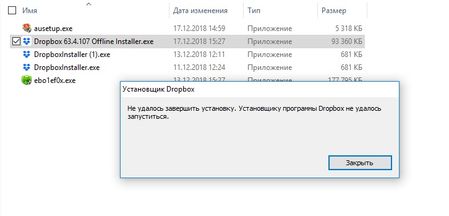
Установщику программы Dropbox не удалось запуститься
Здравствуйте! Мой Windows 10 поймал вирус шифровальщик. С шифровальщиком я справился. Перед расшифровкой я собрал все файлы из Dropbox и перенёс на диск компа. После расшифровки проверил весь ко...
- 7 years ago
Sorry to hear that probst - I've reached out via email to the address you use for your forum's profile so we can have a further look into this with all of my tools available.
Take a look at your inbox for my message and we'll take it from there.
Жаль слышать, что @probst - я связался по электронной почте с адресом, который вы используете для профиля вашего форума, чтобы мы могли более подробно разобраться со всеми моими инструментами.
Посмотрите на ваш почтовый ящик для моего сообщения, и мы возьмем его оттуда.
PoPOV1Ch
6 years agoNew member | Level 2
Привет, у меня такая же проблема. Напишите мне на почту [personal information removed for security purposes] как можно решить проблему

Walter Dropbox Community Moderator
6 years agoDropbox Community ModeratorSorry to hear that PoPOV1Ch - can you try the offline installer first from the following page?
https://www.dropbox.com/downloading?build=69.4.102&plat=win&type=full
If you get an error, please send me a screenshot so I can have a better view of the matter at hand.
Note that, if you'd like account specific assistance, you can always log a ticket through the following page: https://www.dropbox.com/support
Thanks!
Жаль слышать, что @ PoPOV1Ch - вы можете сначала попробовать автономный установщик со следующей страницы?
https://www.dropbox.com/downloading?build=69.4.102&plat=win&type=full
Если вы получили ошибку, пожалуйста, пришлите мне скриншот, чтобы я мог лучше рассмотреть этот вопрос.
Обратите внимание, что если вы хотите получить помощь от конкретной учетной записи, вы всегда можете зарегистрировать заявку на следующей странице: https://www.dropbox.com/support
Спасибо!
About Apps and Installations
Have a question about a Dropbox app or installation? Reach out to the Dropbox Community and get solutions, help, and advice from members.
The Dropbox Community team is active from Monday to Friday. We try to respond to you as soon as we can, usually within 2 hours.
If you need more help you can view your support options (expected response time for an email or ticket is 24 hours), or contact us on X, Facebook or Instagram.
For more info on available support options for your Dropbox plan, see this article.
If you found the answer to your question in this Community thread, please 'like' the post to say thanks and to let us know it was useful!


