We’re Still Here to Help (Even Over the Holidays!) - find out more here.
Forum Discussion

skittel7635
10 months agoNew member | Level 2
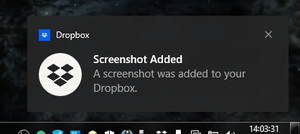
Add an option to choose between the removed "Screenshot Added" notification or the quick actions.
I've gotten really used to seeing this notification every time I took a screenshot and it'd help me know if I saved a screenshot or not and i'm noticing it's gone and there's a new feature that I ass...

jlc2
9 months agoHelpful | Level 5
Agreed. Same here but for Mac OS. Many times users need immediate access to the screenshot they just took and now have to navigate to their cloud storage folder/directory instead of being able to "reveal" it from the notification as it presents.
About Apps and Installations
Have a question about a Dropbox app or installation? Reach out to the Dropbox Community and get solutions, help, and advice from members.
The Dropbox Community team is active from Monday to Friday. We try to respond to you as soon as we can, usually within 2 hours.
If you need more help you can view your support options (expected response time for an email or ticket is 24 hours), or contact us on X, Facebook or Instagram.
For more info on available support options for your Dropbox plan, see this article.
If you found the answer to your question in this Community thread, please 'like' the post to say thanks and to let us know it was useful!


