Your workflow is unique 👨💻 - tell us how you use Dropbox here.
Forum Discussion

FadedPoppy
6 years agoExplorer | Level 3
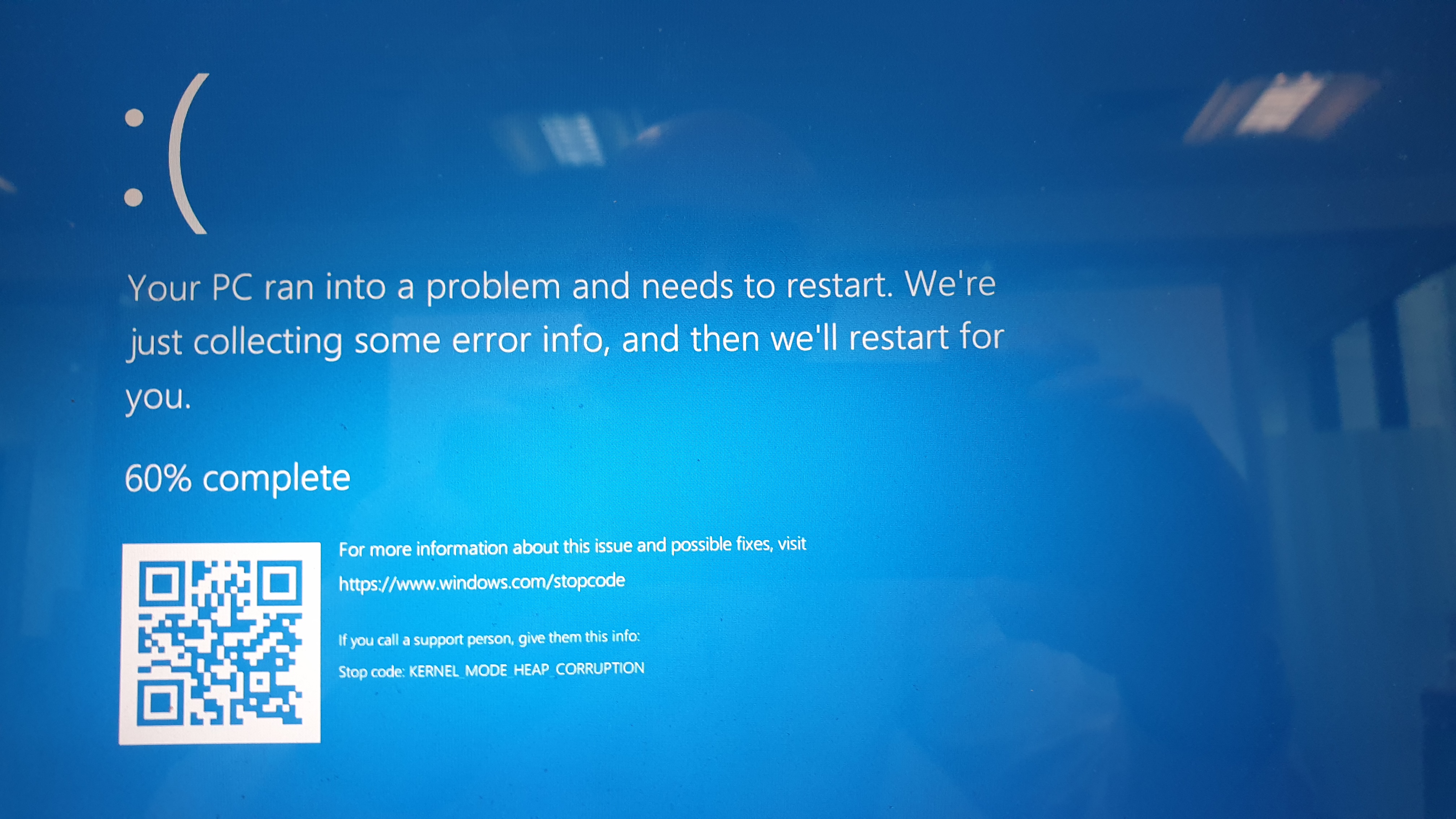
Blue Screen of Death on Win10
Good morning.
Apologies for the very vague question. We are running Dropbox on 2 Win10 PCs. One runs absolutely fine but, on the other, it will run for maybe 30 seconds and then cause the PC to c...
- 6 years ago
Hey everyone, we have a little update to share with you all!
We've been in contact with Symantec and they've let us know that there is an update which should resolve the BSoD. This would be version 15.1 MP1 (Maintenance Patch 1) for the Endpoint Protection Client.
ScubaStephen and gojanpaolo, along with anyone else who may be running an older version of Symantec, please try updating to see if this does the trick for you.
If you still get the BSoD with the updated version of Symantec, then please reach out to them directly for their support for resolution.
Keep us posted with your results!

tblewis0
6 years agoExplorer | Level 4
Daphne I am on a corporate computer and they stated that I would need a support ID. I reached out to the support team for my employer and they aren't sure what they need exactly but are trying to figure it out. I am on a corporate computer with very little access to manipulate the settings for this application.
I also checked the version I am on and I am running a versionbeyond the 15.1 update they mentioned. I am on 15.5.

md2881
6 years agoNew member | Level 2
I just started experiencing this BSOD problem over the weekend after a dropbox software update. I am also using a corporate-managed laptop. Not running Symantec Endpoint Protection here, but my company uses Forcepoint Web Security Endpoint version 8.5.3816. It seems that the problem is not limited to Symantec Endpoint Protection or McAfee.
If whatever update Dropbox put in is causing so many incompatibilities with protection software, why doesn't Dropbox just roll back whatever change is causing the problem? Things were working fine before this change. What feature was added that is so important to cause users experiencing these problems to abandon Dropbox?
- wildman836 years agoExplorer | Level 4
Has smart sync been enabled on your computer? We 3 computers that it has been enabled and 1 that hasn't. All computers are running symantec protection through a corporate IT. Only computer that hasnt had BSOD problems is the one that it hasnt been enabled on. If I go to perferences on my computer and under the general tab I have the option to enable smart sync. If I go to the sync tab on the right then I do not have the option to turn smart sync on or off to save hardrive space. The computers that are BSOD death all the time have that option to turn smart sync on or off in the sync tab. That is the only difference that I can tell. Could this be what has changed in that update? Why isnt my computer crashing with Symantec if symantec is the problem?
- Goldenpope5 years agoNew member | Level 2
Most easy way is system restoring try this working guide https://geeksadvice.com/fix-dpc-watchdog-violation-error-on-windows/
- Shane_Spencer5 years agoNew member | Level 2
I've also had this issue since 21st Jan. I put the issue out to our IT support and they've finally come back and said to re-install dropbox but it crashed withing 3 hours of being installed.
- Daphne5 years ago
Dropbox Community Moderator
Hey everyone, I just have a little update for you all here.
For anyone that's using Symantec Endpoint Protection, the latest version (not just the Maintenance Patch) that should resolve the BSoD should now be available to all.
If you can't update the app yourself, please reach out to your IT department to see if they can update the app on your device. For more info, please check out the Symantec Support Center here.
Also, Shane_Spencer, can you clarify for me if you are using the Symantec Endpoint Protection on your device?
Let me know if you have any questions!
- Shane_Spencer5 years agoNew member | Level 2
I am on Symantec. I have my concerns on if it will be possible to outdate, as I work for a global organisation and this software is controlled by the IT department. Whereas Dropbox I was able to install myself.
- Daphne5 years ago
Thanks for getting back to me here Shane_Spencer!
In this case, I can only recommend reaching out to your IT department to see if they will be able to update Symantec for your company.
Sorry that I can't be of much more help with this. Please do let me know if you have any other questions though, I'd be happy to help where I can.
Thanks!
About Apps and Installations
Have a question about a Dropbox app or installation? Reach out to the Dropbox Community and get solutions, help, and advice from members.
The Dropbox Community team is active from Monday to Friday. We try to respond to you as soon as we can, usually within 2 hours.
If you need more help you can view your support options (expected response time for an email or ticket is 24 hours), or contact us on X, Facebook or Instagram.
For more info on available support options for your Dropbox plan, see this article.
If you found the answer to your question in this Community thread, please 'like' the post to say thanks and to let us know it was useful!


