We’re Still Here to Help (Even Over the Holidays!) - find out more here.
Forum Discussion

jkc-muc
2 years agoExplorer | Level 4
Can't sign into Dropbox desktop app on Mac OS Sequoia
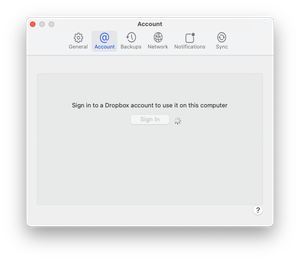
Hi - since upgrading to macOS Sequoia (version 15.0) I can no-longer use Dropbox on my Mac.
It works on my other devices and I can also login to the website.
I signed out then signed into Dro...
- 2 years ago
Hi jkc-muc ,
Thanks for reaching out.
Could you please try doing this:
- Look for search bar
- Then type terminal
- When the terminal windows opens:
- Type the following command
sudo /usr/libexec/ApplicationFirewall/socketfilterfw --add /Applications/Dropbox.app
It will ask you for the password of the Mac next
After this is done can you please see if the issue persists in the dropbox app ?
Can you please test this and get back to us?


Megan Dropbox Community Moderator
2 years agoDropbox Community ModeratorHey jkc-muc!
Does this Help Center article help? If you need more clarification, by all means let me know.

Phil1969
2 years agoExplorer | Level 3
Hello Megan,
I've got the same problem with Sequoia 15
My firewall is set to this for Dropbox and I can't find a way to change it. For the moment, the only way is to turn off completely the firewall... How could I get the firewall turn off only for Dropbox?
Thank you for your response!
About Apps and Installations
Have a question about a Dropbox app or installation? Reach out to the Dropbox Community and get solutions, help, and advice from members.
The Dropbox Community team is active from Monday to Friday. We try to respond to you as soon as we can, usually within 2 hours.
If you need more help you can view your support options (expected response time for an email or ticket is 24 hours), or contact us on X, Facebook or Instagram.
For more info on available support options for your Dropbox plan, see this article.
If you found the answer to your question in this Community thread, please 'like' the post to say thanks and to let us know it was useful!


