We’re Still Here to Help (Even Over the Holidays!) - find out more here.
Forum Discussion

KevinPurcell
3 years agoExplorer | Level 4
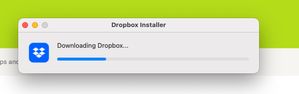
Downloading Dropbox Incredibly slow
I'm trying to download dropbox onto my new M2 Mac Studio with latest Ventura. It's connected to WiFi and I'm on a 500Gbps internet connection. Every other program, app, file downloads very fast due t...

Jay Dropbox Community Moderator
3 years agoDropbox Community ModeratorHi KevinPurcell, thanks for bringing this to our attention.
Do you have any proxy, VPN, firewall, security software, or even ISP/router settings that could be restricting traffic to the following Dropbox domains?
Keep me updated with any details!
 KevinPurcell3 years agoExplorer | Level 4
I have none of those restricting any Dropbox domains listed in the link you provide.
- Jay3 years ago
Do other devices on your network experience the same issue when downloading?
Can you try downloading from a different network connection to see if this helps?
About Apps and Installations
Have a question about a Dropbox app or installation? Reach out to the Dropbox Community and get solutions, help, and advice from members.
The Dropbox Community team is active from Monday to Friday. We try to respond to you as soon as we can, usually within 2 hours.
If you need more help you can view your support options (expected response time for an email or ticket is 24 hours), or contact us on X, Facebook or Instagram.
For more info on available support options for your Dropbox plan, see this article.
If you found the answer to your question in this Community thread, please 'like' the post to say thanks and to let us know it was useful!


