Need to see if your shared folder is taking up space on your dropbox 👨💻? Find out how to check here.
Forum Discussion

magnumuk
3 years agoExplorer | Level 3
Dropbox app. will not connect to internet.
Hi,
I upgraded my iMac to OSX 11.7.2 (Big Sur) a while ago, and since then I have been unable to log in to my account in the Dropbox app. My Dropbox app, is v163.4.5456. On Mac OSX (High Sierra) ...

Walter Dropbox Community Moderator
3 years agoDropbox Community ModeratorHey magnumuk, sorry to hear you're having issues with this.
Could you please send a screenshot of the app's exact status as shown in your menu bar?
Have you tried the offline installer from this page by the way?
Keep me posted!
 magnumuk3 years agoExplorer | Level 3
Hi Walter.
Thank you for your reply.
I have tried re-installing from the link you supplied, same result, I just get the message "No Internet Connection". And the blue connecting bars never cease.
I have perfect internet on every other app, only Dropbox cannot connect.To get me away temporarily, I have installed "Mega", that works just fine, but I would rather my Dropbox
Regards
David.
- Hannah3 years ago
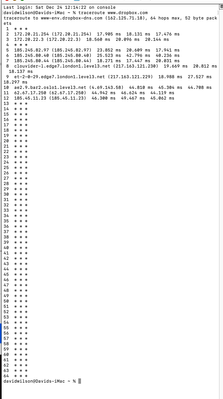
Hey magnumuk, thanks for the additional info and the screenshots.
Can we send you an email, so we can look further into this internally?
- magnumuk3 years agoExplorer | Level 3
Hi Hannah,
Yes, by all means email me direct< presume you have may email address.
Thanks
David

About Apps and Installations
Have a question about a Dropbox app or installation? Reach out to the Dropbox Community and get solutions, help, and advice from members.
The Dropbox Community team is active from Monday to Friday. We try to respond to you as soon as we can, usually within 2 hours.
If you need more help you can view your support options (expected response time for an email or ticket is 24 hours), or contact us on X, Facebook or Instagram.
For more info on available support options for your Dropbox plan, see this article.
If you found the answer to your question in this Community thread, please 'like' the post to say thanks and to let us know it was useful!


