Your workflow is unique 👨💻 - tell us how you use Dropbox here.
Forum Discussion

steve64_64
1 month agoHelpful | Level 5
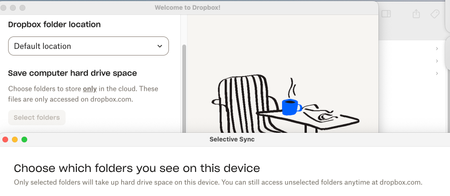
Dropbox doesn't keep my selective sync settings when on OSX Sequoia 15.7.3
Application Affected Dropbox app and Selective Sync Device MBP 2.3 Intel, 16GB Memory, 1TB SSD Operating System/Browser (if using the web) Sequoia 15.7.3
Reference the screenshot below. Th...
 1 month ago
Hi Nancy and Megan,
Due to running out of time over the weekend I submitted the initial query, I wiped the drive and started over from scratch. I upgraded to Tahoe 26.2 and now Dropbox is doing as it should, showing the folders without downloading the contents unless I elect to have them reside locally.
I don’t believe changing the OS factored in this but it may have. The biggest issue originally was that it downloaded files until it basically bricked the computer, it warned me when it had 2mb left on a 1TB SSD that had about 700GB open when it started to sync. When I tried unselecting the folders, in the past it had cleared that space quickly, on this occasion it didn’t clear anything, and after several hours of not being able to do much, I elected to wipe it and start over.
steve64_64
1 month agoHelpful | Level 5
Hi Nancy and Megan,
Due to running out of time over the weekend I submitted the initial query, I wiped the drive and started over from scratch. I upgraded to Tahoe 26.2 and now Dropbox is doing as it should, showing the folders without downloading the contents unless I elect to have them reside locally.
I don’t believe changing the OS factored in this but it may have. The biggest issue originally was that it downloaded files until it basically bricked the computer, it warned me when it had 2mb left on a 1TB SSD that had about 700GB open when it started to sync. When I tried unselecting the folders, in the past it had cleared that space quickly, on this occasion it didn’t clear anything, and after several hours of not being able to do much, I elected to wipe it and start over.

Nancy Dropbox Community Moderator
1 month agoDropbox Community ModeratorThanks for keeping us in the loop! I’m glad to hear you were able to resolve this in the end.
If there’s something else you may need in the future, you can always let us know.
About Apps and Installations
Have a question about a Dropbox app or installation? Reach out to the Dropbox Community and get solutions, help, and advice from members.
The Dropbox Community team is active from Monday to Friday. We try to respond to you as soon as we can, usually within 2 hours.
If you need more help you can view your support options (expected response time for an email or ticket is 24 hours), or contact us on X, Facebook or Instagram.
For more info on available support options for your Dropbox plan, see this article.
If you found the answer to your question in this Community thread, please 'like' the post to say thanks and to let us know it was useful!


