Your workflow is unique 👨💻 - tell us how you use Dropbox here.
Forum Discussion

sejutibasu
3 years agoHelpful | Level 6
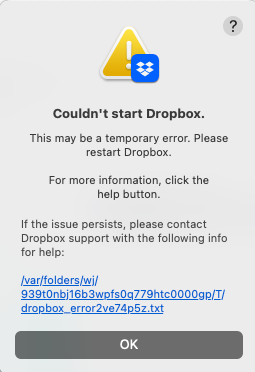
Dropbox on Mac not starting after recent upgrade
Hello everyone!
I am using Mac OS Monterey 12.6.2
I received a Dropbox prompted upgrade recently, which shifted the Dropbox folder to Cloud storage. It took few hours to sync files and worked oka...
 3 years ago
Uninstalled Dropbox.
Deleted Dropbox folder.
De-linked the computer from online account.
Removed all temporary files following a Community post.
Installed Dropbox again, logged in, didn't use the update.
Dropbox folder back on user folder and not in Location.
Files syncing now.
Not the perfect solution, but best I could do after a long online chat, multiple emails and then no response from Dropbox team for 8 hours. I like Dropbox. But today very disappointed with support service.

Yuq
2 years agoNew member | Level 2
it happens after I update my app and also after reinstalling it.
it shows the same errors when I close and relaunch it.

Hannah Dropbox Community Moderator
2 years agoDropbox Community Moderator- Yuq2 years agoNew member | Level 2
sure, do you have my email?
- Hannah2 years ago
Hey Yuq, yes, no worries, I just emailed you, so I'll see you there!
As for you Malpani, I'm sorry to see that you're still having issues.
I can see that I had reached out to you back in August, but I didn't receive any reply, so the ticket was automatically closed after a while.
Are you getting the same error message? Or is your Dropbox app just stuck on "Syncing..."?
If the latter, can you confirm that you've tried all the steps here, and especially the one about giving Dropbox full disk access?
About Apps and Installations
Have a question about a Dropbox app or installation? Reach out to the Dropbox Community and get solutions, help, and advice from members.
The Dropbox Community team is active from Monday to Friday. We try to respond to you as soon as we can, usually within 2 hours.
If you need more help you can view your support options (expected response time for an email or ticket is 24 hours), or contact us on X, Facebook or Instagram.
For more info on available support options for your Dropbox plan, see this article.
If you found the answer to your question in this Community thread, please 'like' the post to say thanks and to let us know it was useful!


