Your workflow is unique 👨💻 - tell us how you use Dropbox here.
Forum Discussion

Jharn
3 years agoHelpful | Level 5
Dropbox preventing GPU to switch display mode
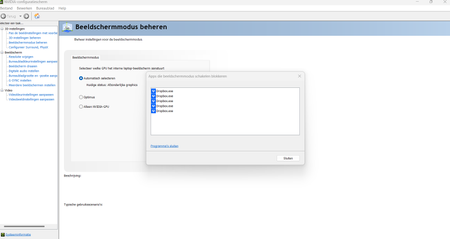
Hello I have a gaming laptop with a discrete RTX 3070 GPU. Nvidia control center manages the switching of the display to the integrated or the discrete GPU, depending on the needs. It should sw...
 2 years ago
Hi Everybody,
We have implemented a hardware acceleration toggle, and we would love if anyone experiencing this could test it out to make sure it solves the problem.
Affected users on Mac can option + click on the tray icon and disable hardware acceleration from the drop down menu.
Affected users on Windows can ctrl + click on the tray icon and disable hardware acceleration from the drop down menu.
Let us know if this works!
Regards,
Ben

Nancy Dropbox Community Moderator
3 years agoDropbox Community ModeratorHey Trisk! You should have now received a new email from us.
Please reply to it, and we’ll take a closer look.
Thanks.
 nnifinn3 years agoNew member | Level 2
I'm having this issue as well on a new laptop with a discrete GPU.
- Dropbox version: 163.4.5456 (experimental versions disabled)
- Operating system: Windows 11 (Version 10.0.22621 Build 22621)
- CPU: i9-12900H
- GPU: Nvidia RTX 3070ti
- Nvidia driver version: 527.56
Please feel free to reach out to me via email and let me know what I can do to help.
Edit: I ignored the "failed to change display mode" message and loaded into my game, and I found that the game used the Nvidia GPU instead of the iGPU. It seems that the error is a non-issue.
 Ash_mz213 years agoExplorer | Level 4
Same problem, both GoogleDriveFS.exe and Dropbox.exe are preventing display mode change,
Windows 11
RTX3060 running 528.02
Dropbox v165.4.4286
- Megan3 years ago
Hi Ash_mz21, welcome to our Community!
Have you tried all the troubleshooting steps mentioned throughout this thread? I'm asking, because I would like to know what you've already tried on your end, before we proceed.
Keep me posted, and we'll take it from there!
 Firsto2 years agoHelpful | Level 5
It feels like no one cares about this problem.
YES, I HAVE THE LATEST VERSION OF THE APP.
YES, THE PROBLEM REPEATS.
 seanature2 years agoHelpful | Level 5
Just had the same issue,
Dropbox program version - v167.4.4719
nvidia driver - 528.24
system - alienware m15r7 (AMD) - with the 3070ti discreet GPU
- seanature2 years agoHelpful | Level 5
Yea sure.
Thanks  Swjiwji2 years agoHelpful | Level 5
I have the same problem. RTX 4080 GPU, get the same message. My dropbox is not a 'beta' version - I've checked.
- Jharn2 years agoHelpful | Level 5
I've been following this thread for a while now, since I posted the original message. It seems quite clear this is not a matter of some rogue version or beta version being a problem. This is a core Dropbox application issue, which will not be resolved individually by opening tickets with all the people who face this exact same problem :). I've posted a workaround in one of my earlier replies, so people can use that if they want to... But it's not ideal for battery life!
- Swjiwji2 years agoHelpful | Level 5
Version 169.4.5684.
Status = up to date.
I've read through this thread and it's clear that there's a problem here which has nothing to do with different versions of Dropbox. Unfortunately I'll have to uninstall Dropbox and cancel my subscription if the problem continues, it's making my computer stall.
- seanature2 years agoHelpful | Level 5
Yea, doesn't look like they're actually concerned about fixing this issue. I never even got any email with any ticket number etc. Pointless place to come for help, other than the clues from other users. Same stuff, different bottle...
 kokuryuha2 years agoHelpful | Level 6Agreed, and I'm pretty positive that is probably some prettying effect in the menu that prevents the driver from switching. I've been exploring other avenues since dropbox doesn't seem to be willing to fix this. It's not the only app that causes the problem, but it's the only one I need to keep running to have stuff synced.
- BenDBX2 years ago
Community Manager
Hi Everybody,
I have spoken with our team about this issue. We are looking into the nature of the error messages. I am curious about one user's experience on this thread:
"I ignored the 'failed to change display mode' message and loaded into my game, and I found that the game used the Nvidia GPU instead of the iGPU. It seems that the error is a non-issue."
Has anyone else determined if your integrated GPU is actually in use while gaming, or if the error message is erroneous and GPU does switch properly? Regardless, we understand that receiving the error message is not ideal. To further assist, we would like to understand if there actually is an underlying GPU switching error for some of our users, or if the problem is the error message itself.
Regards,
Ben
 Mfor182 years agoNew member | Level 2My GPU is actually not switching. It isn’t just an error message.
- kokuryuha2 years agoHelpful | Level 6
Hi BenDBX ,
To clarify, it's entirely possible to ignore the warning, and yes, the dGPU(Nvidia) still does process the 3D graphics, however, the delve deeper, here's the explanation of what the issue is:
Nvidia laptops with a tech called Advanced Optimus use what's called a Mux switch that basically switches connection to the display between the iGPU and the dGPU. It's entirely possible for the dGPU to do the processing and pass the frames through the iGPU buffer, which is how it worked before, but the direct connection (and display switch) is how the dGPU is able to directly control the display with other technology like Nvidia GSYNC (VRR) and such. Preventing this switch prevents this from happening. You know when it occurs when the computer makes a "device connected" sound and the display switches briefly. It can also be noted in the Nvidia control panel when it switches properly, as the entirety of the option set becomes available.
I've only found 3 applications that prevent this from switching: Dropbox, Windows Phone Link, and Intel Arc Control center.
 zky2 years agoNew member | Level 2
Same issue happening to me. Latest drivers. Dropbox v170.4.5895
- BenDBX2 years ago
Hi Everybody,
For anyone still having this issue, try updating your GPU drivers and motherboard firmware to the latest versions. If this does not fix the issue, reply here and I will pass that information onto the appropriate team for further investigation.
Regards,
Ben


About Apps and Installations
Have a question about a Dropbox app or installation? Reach out to the Dropbox Community and get solutions, help, and advice from members.
The Dropbox Community team is active from Monday to Friday. We try to respond to you as soon as we can, usually within 2 hours.
If you need more help you can view your support options (expected response time for an email or ticket is 24 hours), or contact us on X, Facebook or Instagram.
For more info on available support options for your Dropbox plan, see this article.
If you found the answer to your question in this Community thread, please 'like' the post to say thanks and to let us know it was useful!


