Your workflow is unique 👨💻 - tell us how you use Dropbox here.
Forum Discussion

DouglasInNewark
2 years agoExplorer | Level 3
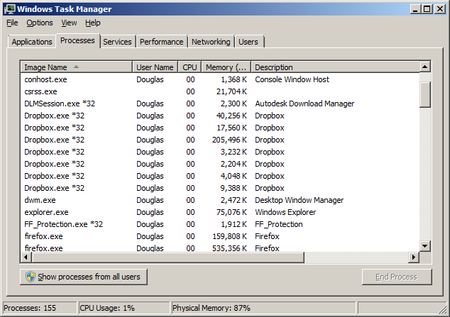
Dropbox using 7 processes and 234 MB of memory
My question is similar to this one: https://www.dropboxforum.com/t5/Apps-and-Installations/Why-are-7-versions-of-Dropbox-exe-running-on-my-Windows-11/td-p/610743, but in that question, the largest a...

DouglasInNewark
2 years agoExplorer | Level 3
I just noticed it the day I posted the message. I think I went into task manager to kill some process, and noticed seven Dropbox tasks, and all the memory they were using.
I rebooted Windows, and Dropbox immediately grabbed something over 220 MB. I just restarted Dropbox. One process immediately ran its memory usage up to 198 MB. The next two biggest were about 10 and 20 MB. By the time I finished typing those sentences, it was up to about 260 MB total. So restarting Windows and Dropbox made no difference.

Megan Dropbox Community Moderator
2 years agoDropbox Community ModeratorHey DouglasInNewark, can you let me know more, in regards to the app's syncing status currently?
Is it up-to-date or is it maybe stuck syncing content?
- DouglasInNewark2 years agoExplorer | Level 3
When I right click on the icon in the system tray, at the bottom of the window that pops up, it says "Your files are up to date."
- DouglasInNewark2 years agoExplorer | Level 3
Oops. Browser gave me an error, so I posted reply again, but it actually had posted my first reply. So, ignore this.
- Jay2 years ago
Hi DouglasInNewark, this would be generally the amount of RAM and processes that Dropbox would use when running.
Could you clarify what OS you're currently running on your device?
- DouglasInNewark2 years agoExplorer | Level 3
My OS is Windows 7 Professional, Service Pack 1, 64-bit.
When you say "this would be generally the amount of RAM and processes that Dropbox would use when running", do you mean it's normal to use 260 MB of memory?

About Apps and Installations
Have a question about a Dropbox app or installation? Reach out to the Dropbox Community and get solutions, help, and advice from members.
The Dropbox Community team is active from Monday to Friday. We try to respond to you as soon as we can, usually within 2 hours.
If you need more help you can view your support options (expected response time for an email or ticket is 24 hours), or contact us on X, Facebook or Instagram.
For more info on available support options for your Dropbox plan, see this article.
If you found the answer to your question in this Community thread, please 'like' the post to say thanks and to let us know it was useful!


