Your workflow is unique 👨💻 - tell us how you use Dropbox here.
Forum Discussion

DouglasInNewark
2 years agoExplorer | Level 3
Dropbox using 7 processes and 234 MB of memory
My question is similar to this one: https://www.dropboxforum.com/t5/Apps-and-Installations/Why-are-7-versions-of-Dropbox-exe-running-on-my-Windows-11/td-p/610743, but in that question, the largest a...
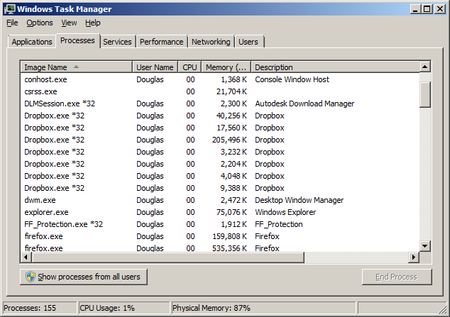

DouglasInNewark
2 years agoExplorer | Level 3
My OS is Windows 7 Professional, Service Pack 1, 64-bit.
When you say "this would be generally the amount of RAM and processes that Dropbox would use when running", do you mean it's normal to use 260 MB of memory?

Milan Bachraty
2 years agoNew member | Level 2
Having the same issue for a long time and looking at the threads the dropbox team seem to be dancing around the issue. Can the dropbox team come up with an update that doesnt hog the PC's memory and CPU. Even Paused uses 650MB or RAM, 50% CPU on Win10 22H2. Restarting makes no difference. If Onedrive can do it with like 10MB ram why cant dropbox?
About Apps and Installations
Have a question about a Dropbox app or installation? Reach out to the Dropbox Community and get solutions, help, and advice from members.
The Dropbox Community team is active from Monday to Friday. We try to respond to you as soon as we can, usually within 2 hours.
If you need more help you can view your support options (expected response time for an email or ticket is 24 hours), or contact us on X, Facebook or Instagram.
For more info on available support options for your Dropbox plan, see this article.
If you found the answer to your question in this Community thread, please 'like' the post to say thanks and to let us know it was useful!


