Your workflow is unique 👨💻 - tell us how you use Dropbox here.
Forum Discussion

BD_CSB
3 years agoHelpful | Level 6
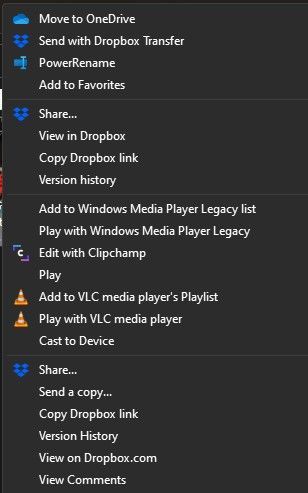
Duplicate Dropbox Options in Context (Right Click) Menu - Windows 11
Title pretty much sums it up. When I right click a file in dropbox or Winblows explorer tree, there are 2 sets of Dropbox options.
With other installed apps and options I've enabled, right click m...
- 2 years ago
Hi everyone,
Our team has implemented a fix for the duplicate context menu items in Windows 11 that you reported.
Please let us know if you still encounter this issue.
Thank you,
Sam


Hannah Dropbox Community Moderator
2 years agoDropbox Community ModeratorHey everyone.
This is a known issue that is currently being addressed.
Our team is working on it, so once we have more info, you'll be updated as well.

Spektr48
2 years agoHelpful | Level 6
Thank you for the info. This should be an easy update, since, IMHO, it is about a simple registry hack, isn't it? Yet, many days have passed, and no update has been launched for the Dropbox client. So, I'll believe it when I see it.
The certificate error when launching Dropbox has not been solved yet, and this was reported ages ago.
I truly hope I'm wrong, but allow me to remain skeptical about Dropbox's user support.
About Apps and Installations
Have a question about a Dropbox app or installation? Reach out to the Dropbox Community and get solutions, help, and advice from members.
The Dropbox Community team is active from Monday to Friday. We try to respond to you as soon as we can, usually within 2 hours.
If you need more help you can view your support options (expected response time for an email or ticket is 24 hours), or contact us on X, Facebook or Instagram.
For more info on available support options for your Dropbox plan, see this article.
If you found the answer to your question in this Community thread, please 'like' the post to say thanks and to let us know it was useful!


