We're making some changes to the Dropbox Community 👩💻 - Find out more here.
Forum Discussion

SGilbert
2 years agoExplorer | Level 4
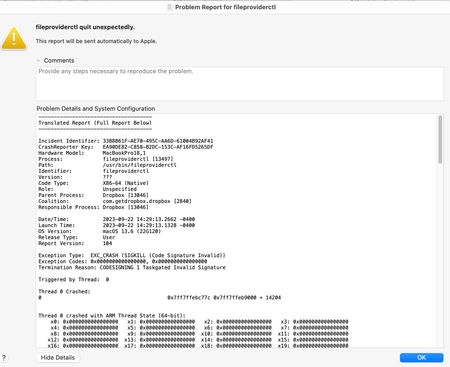
fileproviderctl crash on Mac OS
I just installed OS 13.6 and Dropbox 183.4.7058
One or both is crashing ever few minutes! Anyone else? Cure?
Sorry for multiple posts---No indication it was posted--keeps asking me for L...

Jay Dropbox Community Moderator
2 years agoDropbox Community ModeratorNo worries, glad to have helped out. Enjoy your weekend!

luke-at-gretel
2 years agoExplorer | Level 4
I just want to point out that this is likely due to a critical bug in the final release of macOS 13.6 (22G120) that causes `fileproviderctl` to crash immediately. This is due to some sort of missing code signing signature. Reinstalling Dropbox likely "fixes" it by nature of the bundled extension being re-enabled by default. The underlying bug and issue remains.
see threads:
- https://forums.macrumors.com/threads/macos-13-security-update-mode.2403700/post-32530867
- https://developer.apple.com/forums/thread/737392
 SGilbert2 years agoExplorer | Level 4
I beg to disagree. Reinstalling 183 did not help at all, only installing 182 solved it.
I installed OS 13.6 almost simultaneously, so it could be the problem
In my mind, 183 has a fault.
- luke-at-gretel2 years agoExplorer | Level 4I guess then that v 183 uses or enforces the FileProvider API while 182 doesn't. Hard to know because Dropbox doesn't publish release notes as far as I know.
About Apps and Installations
Have a question about a Dropbox app or installation? Reach out to the Dropbox Community and get solutions, help, and advice from members.
The Dropbox Community team is active from Monday to Friday. We try to respond to you as soon as we can, usually within 2 hours.
If you need more help you can view your support options (expected response time for an email or ticket is 24 hours), or contact us on X, Facebook or Instagram.
For more info on available support options for your Dropbox plan, see this article.
If you found the answer to your question in this Community thread, please 'like' the post to say thanks and to let us know it was useful!


