We’re Still Here to Help (Even Over the Holidays!) - find out more here.
Forum Discussion

Moez18
10 months agoNew member | Level 1
How can I open shared links directly in Finder/Explorer?
Hello,
One of the most important and highly requested missing features in Dropbox is the ability to open a shared link for Files and Folder from a team directly in Finder (Mac) or Explorer (Windows...

Jay Dropbox Community Moderator
10 months agoDropbox Community ModeratorHi Moez18, thanks for bringing this to our attention.
In order for the Open button to work, you would need to ensure that your system meets these requirements.
If you're opening your own shared link to a file that is already in your Dropbox folder, meaning you're already logged into your account, you should see the Open button on the site just under the filename.
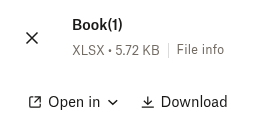
It wouldn't be available if this is only a shared link to a file that doesn't exist in your Dropbox account.
If you need any further assistance, please let me know.
About Apps and Installations
Have a question about a Dropbox app or installation? Reach out to the Dropbox Community and get solutions, help, and advice from members.
The Dropbox Community team is active from Monday to Friday. We try to respond to you as soon as we can, usually within 2 hours.
If you need more help you can view your support options (expected response time for an email or ticket is 24 hours), or contact us on X, Facebook or Instagram.
For more info on available support options for your Dropbox plan, see this article.
If you found the answer to your question in this Community thread, please 'like' the post to say thanks and to let us know it was useful!


