We’re Still Here to Help (Even Over the Holidays!) - find out more here.
Forum Discussion

Martin87
2 years agoNew member | Level 1
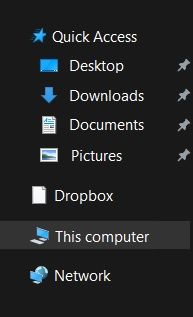
How do I delete the Dropbox icon from my Quick Access on Windows?
I don't know if there's something wrong with me, but I genuinely don't know what to do.
I'm not using Dropbox currently, so I deleted it from my computer (via Control Panel) and everything is fine....

Martin87
2 years agoNew member | Level 1
Oh wow, that's a fast answer.
I would like to remove Quick Access option. I have already manually deleted my Dropbox folder and after doing so I can't do anything about the mentioned icon as I'm getting the error saying that "Location is no longer available".
EDIT: I just realised that the topic name may be little confusing, sorry for that.

Megan Dropbox Community Moderator
2 years agoDropbox Community ModeratorHi Martin87, no worries, I just edited the title of the post for you. 😀
In regards to the Quick Access, that's something Windows related, and not directly Dropbox-related.
I did some research online on my end for you, and found these steps, let me know if they help.
About Apps and Installations
Have a question about a Dropbox app or installation? Reach out to the Dropbox Community and get solutions, help, and advice from members.
The Dropbox Community team is active from Monday to Friday. We try to respond to you as soon as we can, usually within 2 hours.
If you need more help you can view your support options (expected response time for an email or ticket is 24 hours), or contact us on X, Facebook or Instagram.
For more info on available support options for your Dropbox plan, see this article.
If you found the answer to your question in this Community thread, please 'like' the post to say thanks and to let us know it was useful!


