Your workflow is unique 👨💻 - tell us how you use Dropbox here.
Forum Discussion

PMukherjee
1 year agoNew member | Level 1
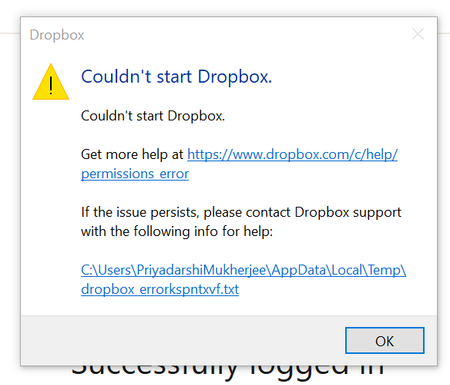
I reinstalled the Dropbox app on my Windows computer and now I get a startup error.
I had some issues with my Dropbox files and so, I decided to uninstall the entire Dropbox folder from my laptop and reinstall again. But the problem is that the following error is coming (screen...

alexned Dropbox Engineer
1 year agoDropbox EngineerHi PMukherjee,
Did you install Dropbox through Windows Store or did you download the installer from the Dropbox website?
I will link you some reinstallation steps that are meant to do an extensive cleanup of your environment. Please follow the steps below, but before reinstalling Dropbox in step 11, run the following command in Powershell:
# Open PowerShell and run the following command:
Get-AppxPackage DropboxInc.Dropbox | Remove-AppxPackage
Here are the steps:
https://help.dropbox.com/installs/advanced-reinstall
If after following these steps you are still encountering the issue, please try to choose a different location for your Dropbox directory after the installation.
About Apps and Installations
Have a question about a Dropbox app or installation? Reach out to the Dropbox Community and get solutions, help, and advice from members.
The Dropbox Community team is active from Monday to Friday. We try to respond to you as soon as we can, usually within 2 hours.
If you need more help you can view your support options (expected response time for an email or ticket is 24 hours), or contact us on X, Facebook or Instagram.
For more info on available support options for your Dropbox plan, see this article.
If you found the answer to your question in this Community thread, please 'like' the post to say thanks and to let us know it was useful!


