Your workflow is unique 👨💻 - tell us how you use Dropbox here.
Forum Discussion

The TechJedi
4 years agoHelpful | Level 5
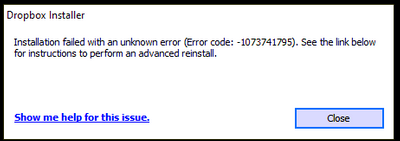
Installation Failed Error Code 1073741795
I keep getting the same error over and over again. I have tried every suggested resolution and nothing has worked. Anyone?
- 3 years ago
Our engineers have put out a new Beta Build: 150.3.4929, which fixes the 'Installation failure: Error code 1073741795'. You can find details about the fix, and how to install it, here.

Emmet Community Manager
3 years agoCommunity ManagerOur engineers have put out a new Beta Build: 150.3.4929, which fixes the 'Installation failure: Error code 1073741795'. You can find details about the fix, and how to install it, here.
 AppoCaly3 years agoHelpful | Level 6
 jackbau3 years agoHelpful | Level 5
Hi all,
I cannot confirm it, same error code appears when I try to install dropbox: 1073741795.
I have a German dropbox version here.
- Tom3 years agoExplorer | Level 4
Didn't work, error code persists.
 hlussiatti3 years agoExplorer | Level 3
Hi, I've tried everything it was said in the forum and had no results. Still having the same error.
Any additional help? Thanks!
- hlussiatti3 years agoExplorer | Level 3
Hollo, I've tried this soltion and no success. Is there any other option? I would like to continue using Dropbox.
Thanks!
- Megan3 years ago
Dropbox Community Moderator
Hi hlussiatti, welcome to our Community!
Have you tried all the troubleshooting steps mentioned throughout this thread, including the offline installer? If so, do you still get the same message?
Let me know more, and we'll take it from there!
- hlussiatti3 years agoExplorer | Level 3
Hi Megan. Thanks a lot for your reply.
Yes, I've tried every solution proposed in the the forum. I've tried using Beta Build: 150.3.4929, the newest version and several old versions. I also have tried on line and off line installer, deleting all files in the registre and still having same error.


About Apps and Installations
Have a question about a Dropbox app or installation? Reach out to the Dropbox Community and get solutions, help, and advice from members.
The Dropbox Community team is active from Monday to Friday. We try to respond to you as soon as we can, usually within 2 hours.
If you need more help you can view your support options (expected response time for an email or ticket is 24 hours), or contact us on X, Facebook or Instagram.
For more info on available support options for your Dropbox plan, see this article.
If you found the answer to your question in this Community thread, please 'like' the post to say thanks and to let us know it was useful!


