Your workflow is unique 👨💻 - tell us how you use Dropbox here.
Forum Discussion

patrick minas
5 years agoExplorer | Level 3
My AppData folder is more than 24 GB. What gives?
Hi,
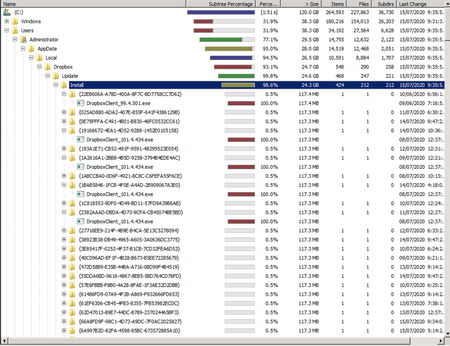
I have up to 24GB in Users/UserName/AppData/Local/Dropbox/Update/Install.
It contains hundreds of subfolders all with some version of Dropbox clients.
See attached.
I cannot delete them ...

patrick minas
5 years agoExplorer | Level 3
I've uninstalled Dropbox and I am trying to delete these files while logged in as Administrator but still cant. Can't even change the persimssions or the owner of these files. See attached.

Jay Dropbox Community Moderator
5 years agoDropbox Community ModeratorThanks for the images. Could you clarify if you're signed in under a normal user profile, or the Administrator profile, when making the deletions?
Generally, that profile is hidden by default, and it isn't possible to elevate normal users to that level.
Deletion wouldn't be possible if you're on a normal user profile, since the app was installed in the Administrator account according to the filepath you have there.
About Apps and Installations
Have a question about a Dropbox app or installation? Reach out to the Dropbox Community and get solutions, help, and advice from members.
The Dropbox Community team is active from Monday to Friday. We try to respond to you as soon as we can, usually within 2 hours.
If you need more help you can view your support options (expected response time for an email or ticket is 24 hours), or contact us on X, Facebook or Instagram.
For more info on available support options for your Dropbox plan, see this article.
If you found the answer to your question in this Community thread, please 'like' the post to say thanks and to let us know it was useful!


