Your workflow is unique 👨💻 - tell us how you use Dropbox here.
Forum Discussion

Jrocchio
12 days agoHelpful | Level 5
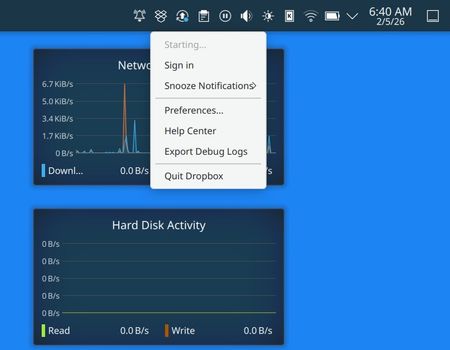
New installation of the desktop app on Fedora remains on Starting...
Application Affected
Dropbox deamon for Linux
System Operating System: Fedora Linux 43
KDE Plasma Version: 6.5.5
KDE Frameworks Version: 6.22.0
Qt Version: 6.10.1
Kernel Versio...
 8 days ago
I did contact the official Dropbox support team. That, in itself, was a challenge. Apparently you have to convince the chat-bot that the issue is beyond it's capabilities; then a human will come on and if they can't solve they will then, finally, open a ticket; which she did. It's been esclated up two levels now and so far I've heard nothing back. BUT...
I did figure it out this morning. Ya-all are going to smirk at me, rightly so. Let me start by stating what my intentions were, which will help to make sense of it.
Intention: I have two SSDs installed in the laptop. My intention was to use one for the OS and all the apps. Then dedicate the 2nd SSD to being only a replica of my Dropbox. This way I could futz around with the OS, mess it up, then reformat and reinstall the OS and apps without having to resync my whole Dropbox across the network each time.
The Error: I created a mount point for the Dropbox folder under my home directory. And I named it “Dropbox.” In my naïveté I assumed that Dropbox you would see this and do it’s thing. To make a long story short: Well, it did see it, but it couldn’t gain access to it. Instead of telling the user this key fact it just hung there, forever, waiting to be granted access. No message to the user. No attempt to create an alternative directory for itself. Not even any entries in the journal. This last one, no journal entries, I do find to be a pretty perplexing oversight on the part of your developers (even tho at base it was my error).
The Solution: I moved the mount point for the SSD into the /media directory (as /media/SSD-dropbox-local). Dropbox then fired up and started syncing. I used it’s ‘Preferences…’ to move the sync location to the mounted SSD in /media. Then I added the Dropbox folder at /media/SSD-dropbox-local to my ‘places’ list in Dolphin.
Alls well that ends well.
Jrocchio
11 days agoHelpful | Level 5
Jay: I do not believe so. I am not running a VPN. I've no proxy set up. I'm not running any anti-virus or other security software other than the normal Linux Firewall. I believe my router settings are all normal, tho I do have a Raspberry Pi in a DMZ defined in my router (for home automation). But I'm not blocking any domains in my router (and dropbox, on my desktop PC, and on my Pixel phone for that matter, is working fine through the same home router).
- Jay11 days ago
Dropbox Community Moderator
If you're not on a Dropbox Basic plan with more than 3 devices connected, could you try an advanced reinstall of the app using the steps in this link?

About Apps and Installations
Have a question about a Dropbox app or installation? Reach out to the Dropbox Community and get solutions, help, and advice from members.
The Dropbox Community team is active from Monday to Friday. We try to respond to you as soon as we can, usually within 2 hours.
If you need more help you can view your support options (expected response time for an email or ticket is 24 hours), or contact us on X, Facebook or Instagram.
For more info on available support options for your Dropbox plan, see this article.
If you found the answer to your question in this Community thread, please 'like' the post to say thanks and to let us know it was useful!


